Minecraft Bedrock Allowlist and Permissions: allowlist.json and XUIDs
Turn on the Bedrock allowlist, add players by gamertag or XUID, set operator, member and visitor roles in permissions.json, plus the whitelist.json trap.
Bedrock Edition controls who may join and what they may do with two files that have no direct Java Edition equivalent: allowlist.json decides who gets in, and permissions.json decides what they can do once they are there. Neither file works the way Java's whitelist.json and ops.json do, and the differences are the single most common reason a working Bedrock server appears to lock its own owner out.
This guide covers turning the allowlist on, adding players by gamertag or XUID, why the XUID matters, the three operator roles, and how /op behaves differently to Java. For every server.properties key mentioned here, see Bedrock server.properties: The Complete Key Reference. For first boot and general operation, see Setting up your Bedrock Minecraft server.
Verified against Bedrock Dedicated Server 1.26.44.3
File formats, commands and console messages below were read from the official BDS 1.26.44.3 archive — its
bedrock_server_how_to.htmlmanual, its shipped configuration files and the server binary's own message catalogue — on 18 August 2026. That build corresponds to Bedrock Edition 26.44.
The Allowlist Is On By Default Now
This is new, and it catches people out. Bedrock Dedicated Server shipped allow-list=false for years. It now ships allow-list=true, a change that landed in the 26.30 release: BDS 1.26.23.1 still shipped false, and 1.26.30.5 shipped true.
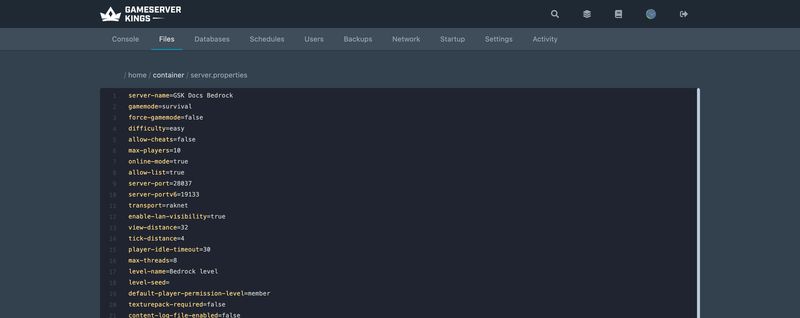
A freshly created server therefore accepts nobody, including you. Players who try get:
You're not invited to play on this server.and the console prints a hint:
Use allowlist add <playername> for you and your friends so that they can access the server, or modify allowlist.json manually.The right fix is to add yourself to the list, not to switch the list off. An open Bedrock server on a public IP will be found.
The allowlist requires
online-mode=trueThe two settings are linked. Turn Xbox Live authentication off and the server refuses to operate the allowlist at all, reporting "Using an allowlist without online authentication can be dangerous and is not allowed." Without authentication, a gamertag is just a string anyone can claim, so the list would guarantee nothing. Leave
online-mode=true.
allowlist.json
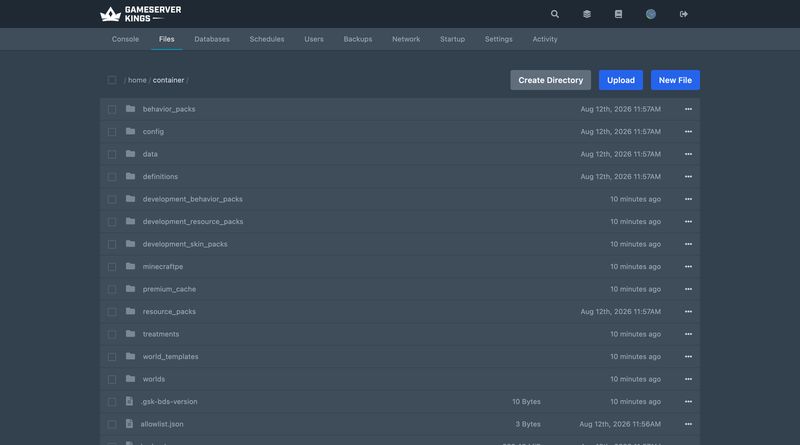
The file lives beside the server executable and holds a JSON array of player objects. A fresh install ships it containing just [].
[
  {
    "ignoresPlayerLimit": false,
    "name": "MyPlayer"
  },
  {
    "ignoresPlayerLimit": false,
    "name": "AnotherPlayer",
    "xuid": "274817248"
  }
]| Field | Type | Meaning |
|---|---|---|
name |
String | The player's Xbox Live gamertag |
xuid |
String | Optional. The player's XUID. If absent, the server fills it in the first time somebody with a matching name connects |
ignoresPlayerLimit |
Boolean | Whether this player may join past max-players |
ignoresPlayerLimit is not a bypass of everything. Mojang's own documentation notes a further soft limit of 30 connected players (or one higher than max-players) that applies even to players using this option — the feature exists so a handful of staff can get in when the server is full, not to raise the cap.
Bedrock's allowlist applies to operators too
In Java Edition, a server operator can always connect while the whitelist is active even if their entry is missing. Bedrock does not do this. Every player must be on the allowlist regardless of operator status, so opping yourself does not get you past your own allowlist.
Adding Players: Gamertag vs XUID
The easiest route is the console, which writes the file for you:
> allowlist add ExampleName
> allowlist remove ExampleNameA gamertag containing a space has to be quoted:
> allowlist add "Example Name"You do not need to know a player's XUID to add them. The name is enough, and the XUID is resolved and written into the file the first time that player actually connects.
Why the XUID matters anyway
An entry with only a name is matched on the gamertag, and on Bedrock a player's username is their Xbox gamertag. Gamertags are not permanent: Microsoft lets an account change its gamertag (free the first time, paid after that), and once a player does, a name-only entry no longer matches them. An entry that has captured the player's xuid keeps working, because the XUID is the account's real identifier and never changes.
That is why the server backfills it, and it is the argument for letting each player connect once on a quiet server before you rely on the list: after that first successful join, their entry is anchored to the account rather than to a display name.
XUIDs matter more still for permissions.json, which accepts only XUIDs and has no name field at all.
Finding a player's XUID
Have them connect once and read it out of the console. The server logs it on every join:
Player connected: ExampleName, xuid: 2535465768754321There is a matching Player disconnected: line, and the /kick command accepts either a player name or an XUID on Bedrock, which is useful when a gamertag has awkward characters in it.
Managing the List While the Server Runs
| Command | What it does |
|---|---|
allowlist on |
Turns the allowlist on |
allowlist off |
Turns the allowlist off |
allowlist list |
Prints the list the server is currently using |
allowlist reload |
Re-reads allowlist.json from disk |
allowlist add <name> |
Adds a player and writes the file |
allowlist remove <name> |
Removes a player and writes the file |
allowlist onandallowlist offdo not editserver.propertiesThey change the running server only. The
allow-listvalue inserver.propertiesis untouched, so the next restart goes back to whatever the file says. If you want the change to stick, editallow-listas well.
If you edit allowlist.json by hand — through the panel's File Manager, or over SFTP — run allowlist reload afterwards. The server does not notice the file changing on its own.
The whitelist.json Trap
Bedrock used to call this file whitelist.json, and the server.properties key used to be white-list. The key was renamed to allow-list in Bedrock 1.18.10, and the file was renamed to allowlist.json alongside it.
For backwards compatibility the server still honours the old name — and that compatibility is a trap. Mojang's own manual is explicit:
If a
whitelist.jsonfile is also present, it will be used instead ofallowlist.json.
So a server that has inherited a stale whitelist.json from an old backup, an old host, or a guide written before 1.18.10 will quietly ignore every change you make to allowlist.json. Symptom: you add yourself, run allowlist reload, the console reports success, and you still cannot join.
To migrate properly, Mojang's documented sequence is: delete the default allowlist.json, rename whitelist.json to allowlist.json, then restart the server.
permissions.json and the Three Roles
Access and privilege are separate systems on Bedrock. Being on the allowlist gets a player through the door; permissions.json decides what they can do next.
[
  {
    "permission": "operator",
    "xuid": "451298348"
  },
  {
    "permission": "member",
    "xuid": "52819329"
  },
  {
    "permission": "visitor",
    "xuid": "234114123"
  }
]Two fields, both required, and no name field — permissions.json is XUID-only. That is also why it needs online-mode=true: an XUID can only be established by online verification of the account.
| Role | What it grants |
|---|---|
operator |
Everything member can do, plus operator commands, world settings, teleport, and the ability to change other players' permissions and kick them |
member |
Mining, building, using doors and switches, opening containers, attacking players and mobs. No commands |
visitor |
Observation only. A visitor can still interact with entities — trading with a villager, for instance — and can use and manage items already in their inventory, but cannot change the world |
A player who is not listed gets whatever default-player-permission-level in server.properties says, which is member out of the box.
Reload and inspect the file with:
> permission reload
> permission listpermission reload is required after any hand edit; as with the allowlist, the server does not watch the file.
There is a fourth role, but not in this file
In-game, an operator can open the Player Permissions screen from the social drawer and set a Custom role, toggling Build, Mine, Use doors and switches, Open containers, Attack Players, Attack Mobs, Operator Commands and Teleport individually. Custom is set per player from inside the game, not from the file —
permissions.jsonaccepts onlyoperator,memberandvisitor.
/op and /deop on Bedrock
Both commands exist, and both behave differently to Java.
> op ExampleName
> deop ExampleNameThe console replies Opped: ExampleName or De-opped: ExampleName.
/oponly persists for authenticated accountsIf the player is authenticated to Xbox Live,
opwrites them intopermissions.json— creating the file if it does not exist — and the promotion survives a restart. If the player is not connected to Xbox Live, the promotion lasts for the current server session only. On restart they revert todefault-player-permission-level. This is a second reason to leaveonline-mode=true.
deop demotes a player to member, and likewise persists to permissions.json for authenticated accounts.
Operators still need allow-cheats
allow-cheats defaults to false, and it sits above the whole permission system. With it off, nobody can run a slash command — operator or not. If /gamemode does nothing for a confirmed operator, check allow-cheats before you touch permissions.json. It is one of the two settings changesetting can flip on a running server, though the change does not write back to server.properties.
Permission Levels in Practice
Bedrock does have numeric permission levels internally, but where Java exposes them directly through op-permission-level and the level field in ops.json, Bedrock derives them from context. Making a player Operator gives them:
| Where | Level granted |
|---|---|
| A dedicated server or Realm | 1 |
| A joined multiplayer game over LAN or online | 2 |
| A locally hosted world | 3 |
Members are always level 0. Level 0 is not "no commands" — /help, /list, /me, /msg, /tell, /gametips and /packstack are available to everyone. Everything that changes the world starts at level 1.
The practical consequence for a dedicated server is that there is only one tier of admin. Java's four-level ladder, where a moderator at level 1 can bypass spawn protection but not run /stop, has no Bedrock equivalent. An operator on a Bedrock server has the full set. If you need graded staff ranks, the Custom role's individual toggles are the closest thing available, and they are set per player, in-game.
Opping another player permanently disables achievements for that world
Setting any other player to Operator switches achievements off for the world, and the change cannot be undone by demoting them again. It is worth telling players before you hand out operator on a survival world they care about.
Java Edition, Side by Side
| Concept | Java Edition | Bedrock Edition |
|---|---|---|
| Access list file | whitelist.json |
allowlist.json |
| Access list key | white-list |
allow-list |
| Identifier used | UUID | XUID, or gamertag with the XUID backfilled |
| Operators bypass the list | Yes | No |
| Permission file | ops.json |
permissions.json |
| Permission model | Numeric level 0–4 per operator | Three named roles |
| Default for new players | Always non-operator | default-player-permission-level, default member |
| Bypass the player cap | bypassesPlayerLimit in ops.json |
ignoresPlayerLimit in allowlist.json |
| Force a re-check of the list | enforce-whitelist |
No equivalent |
| Reload after hand-editing | /whitelist reload |
allowlist reload / permission reload |
For the Java side in full, see Minecraft Op Permission Levels: 0 to 4 Explained.
Common Issues
- Nobody can join a brand-new server, including you.
allow-listnow defaults totrue. Runallowlist add <YourGamertag>in the console. - "You're not invited to play on this server." That is the allowlist rejecting the player. Check the exact gamertag spelling with
allowlist list. - Allowlist changes have no effect. Either you edited the file without running
allowlist reload, or a leftoverwhitelist.jsonis overridingallowlist.json. Check for both files. - The server refuses to use the allowlist at all.
online-modeisfalse. Set it back totrueand restart. - A player was opped, then lost it after a restart. The account was not authenticated to Xbox Live, so the promotion was session-only and never reached
permissions.json. - An operator cannot run any commands.
allow-cheats=false. That switch overrides the permission system entirely. - A returning player is suddenly blocked. They changed their gamertag and their allowlist entry has no
xuid. Re-add them under the new name, or add the XUID from an older console log. permissions.jsonedits ignored. Runpermission reload, and confirm the entry uses the XUID rather than a gamertag — there is no name field in this file.
Sources
bedrock_server_how_to.html, the manual shipped inside the official Bedrock Dedicated Server archive, version 1.26.44.3- minecraft.wiki — Server § Allowlist and Permission list
- minecraft.wiki — Permission level
What to Read Next
- Bedrock server.properties: The Complete Key Reference for
allow-list,online-mode,allow-cheatsand every other key - Setting up your Bedrock Minecraft server for first boot, add-ons, backups and connecting
- Minecraft Server Commands for the wider command set
- Setting up CrossPlay for Minecraft if you are running Java with Bedrock clients instead
Made with 💜 by GameServerKings

Need a Minecraft server?
Deploy an instantly-provisioned Minecraft server on high-clock hardware — DDoS protected, no contracts, cancel anytime.
From $4.80 /month