Minecraft Grief Protection and Rollback
Undo griefing with CoreProtect rollbacks, lock builds down with WorldGuard regions, and use vanilla spawn protection and game rules to limit the damage.
Someone logs in, hollows out your base, empties the chests and logs off. This is the most common reason a Minecraft server owner installs their first plugin, and it is the one problem where reacting well matters more than reacting fast — a panicked world restore can cost you more than the griefer did.
There are three separate jobs here, and the tools that do them are not interchangeable.
| Job | Tool | What it gives you |
|---|---|---|
| Know who did what, and undo it | CoreProtect | A per-block log of every change, and a surgical rollback |
| Stop it happening again | WorldGuard + WorldEdit | Named regions with owners, members and flags |
| Survive the case neither can fix | Backups | The whole world as it was at a point in time |
This guide covers all three on a Java Edition server. Plugin installation itself is covered in How to install plugins for Minecraft Java Edition. Who is allowed on the server at all is a separate question, covered in Minecraft Whitelist and Ban Management.
Start With What Vanilla Already Gives You
Two vanilla levers cost nothing and are worth setting on day one.
Spawn Protection
spawn-protection=16spawn-protection defines a square around world spawn that only operators can edit. The number is a radius, not a side length — the protected square is 2x+1 blocks across, so the default 16 covers 33×33. 1 protects 3×3, and 0 disables it entirely.
Spawn protection turns itself off if you have no ops
If there are no operators in
ops.json, the server disables spawn protection automatically — otherwise nobody could build there at all. That surprises people who set it on a brand-new server and find it doing nothing: op yourself first. Bypassing spawn protection is granted at operator permission level 1, so even a junior moderator can build inside it. See Minecraft Op Permission Levels.
Game Rules That Limit Damage
Game rules live in the world save rather than a config file, so they apply immediately and persist across restarts. Four matter for grief control:
| Game rule | Default | Effect |
|---|---|---|
mob_griefing |
true |
Set false to stop creepers, endermen, ghasts, withers, ravagers, silverfish, snow golems, villagers and the ender dragon changing blocks. Mobs still damage players; they just stop rearranging the world |
tnt_explodes |
true |
Set false and activated TNT simply does not explode. TNT minecarts cannot be ignited either |
fire_spread_radius_around_player |
128 |
Maximum distance in blocks that fire spreads around a player. 0 disables fire spread entirely; -1 is unlimited |
pvp |
true |
Set false to stop players damaging each other server-wide |
gamerule mob_griefing false
gamerule tnt_explodes false
gamerule fire_spread_radius_around_player 0These are the current, post-1.21.11 names
Java Edition 1.21.11 moved every game rule into a registry and renamed them from camelCase to snake_case.
fire_spread_radius_around_playerin particular replaced the olddoFireTickrule rather than being renamed from it, so a find-and-replace on an old guide will not get you there. On 1.21.10 and earlier the old names still apply. The full mapping is in Minecraft Server Commands.
Vanilla gives you one protected square at spawn and a handful of world-wide switches. It cannot protect a player's base, cannot tell you who broke a block, and has no undo at all. That is the gap the next two plugins fill.
CoreProtect: Logging and Rollback
CoreProtect is the de-facto standard block logger for Paper, Spigot and Purpur. It records block placements and breaks, container transactions, chat, commands, kills, spawns and logins, and can replay any slice of that log backwards. Install it, restart, and it logs from that moment — there is nothing to configure first.
What follows is the working subset. Every parameter, every action letter, the hashtags, the permission tree and the storage backends are in the full guide: CoreProtect: Logging, Lookups and Rollbacks for Minecraft.
| Command | Short | What it does |
|---|---|---|
/co inspect |
/co i |
Toggle the inspector |
/co lookup |
/co l |
Query the log |
/co rollback |
/co rb |
Undo logged changes |
/co restore |
/co rs |
Redo them — the opposite of a rollback |
/co near |
— | A lookup with a radius of 5 |
/co undo |
— | Revert your last rollback or restore |
/co purge |
— | Delete old log data |
Step One: Inspect
Turn the inspector on with /co i. The plugin's own help lists what each action tells you:
| Action | What you learn |
|---|---|
| Left-click a block | Who placed that block |
| Right-click a block | What adjacent block was broken |
| Place a block | What block was broken at that location |
| Right-click a door, chest or similar | Who last used it |
/co i again turns it off. For most incidents this is the whole investigation: right-click into the hole where your wall used to be and read the name.
Step Two: Look Up
/co lookup takes the same parameters as /co rollback, which is why it is worth learning once.
| Parameter | Meaning | Examples |
|---|---|---|
u:<user> |
One or more users | u:Notch, u:Notch,Intelli, u:#creeper,#tnt |
t:<time> |
How far back to look | t:1h, t:5d2h, t:2w,5d,7h |
r:<radius> |
Area to limit to | r:20, r:#global, r:#world_nether, r:#we |
a:<action> |
Restrict to one action | a:block, a:-block, a:container |
i:<include> |
Only these blocks or items | i:stone, i:diamond_ore |
e:<exclude> |
Everything except these | e:tnt, e:stone,dirt |
Actions are block, container, inventory, item, click, kill, spawn, session, chat, command, sign and username. Several take a prefix — + for added, - for removed — so a:-block is breaks only, a:+container is items put into chests.
/co lookup i:diamond_ore t:1h a:-block/co lookup u:Steve t:3d a:containerResults are paginated: /co l <page> moves between pages and /co l 1:10 returns ten lines starting at page one. Adding #count returns just the number of matching rows, which is the fastest way to size an incident before touching anything.
Step Three: Roll Back
Rollbacks and lookups have different default radii
This is the mistake that turns a small incident into a big one. A lookup with no
r:searches the entire server. A rollback with nor:uses a radius of 10 blocks around you. The command you just ran to survey damage across the whole map will, if you swaplookupforrollback, fix only the 10 blocks nearest your feet — and you will believe the job is done. Always state the radius on a rollback.
Preview first. #preview runs the rollback visually for you alone without changing the world:
/co rollback u:Griefer t:2h r:#global #preview
/co rollback u:Griefer t:2h r:#globalIf the result is wrong, /co undo reverses your last rollback or restore. Two refinements are worth knowing: a:-block rolls back only what they broke, leaving their placements alone, and e:stone,dirt excludes block types you would rather keep. With WorldEdit installed, r:#worldedit (or r:#we) limits the rollback to your current selection — the cleanest way to repair one building without touching its neighbours.
Every CoreProtect command has its own permission, all defaulting to op, plus a set of per-action child permissions designed to be set negative so a junior moderator can investigate block damage without being able to read everyone's chat. The full node list and a worked moderator rank are in CoreProtect: Logging, Lookups and Rollbacks; setting a negative node is a LuckPerms job, covered in How to Set Up LuckPerms Permissions for Minecraft.
Retention: Your Rollback Window Is Finite
/co purge t:30dFrom the console, /co purge can delete anything older than 24 hours. In-game it will only delete data older than 30 days — a guard rail against someone purging the evidence of their own griefing. You can scope it to a world (r:#world_nether) or to block types (i:stone,dirt). CoreProtect 24.0 and later can also purge on a daily schedule via auto-purge in config.yml, though that feature is exclusive to the project's Patreon builds; otherwise put a /co purge on the panel's Schedules tab.
Retention is the real limit on what you can undo
Whatever
t:value you purge at is your rollback window. A griefer who plants a trap and triggers it two months later is past the end of a 30-day log, and CoreProtect will have nothing to replay. Pick a retention period you can live with, and remember it is the number that decides whether an old incident is recoverable at all.
The database lives in plugins/CoreProtect/, selected by database-type in config.yml. Version 25.0 and later default new installs to an embedded DuckDB file; earlier builds use SQLite, or MySQL if you point them at one — create one from the Databases tab, per How to create a Database via your panel. As of August 2026 the current public Community Edition release is v24.0, which added Minecraft 26.1 support and sets its minimum at 1.16.5. A separate Fabric version exists, distributed through the project's Patreon rather than the main download page.
WorldGuard: Stop It Happening Again
CoreProtect tells you what happened. WorldGuard stops it, by letting you draw named 3D regions and say who may build in them.
This section is the short version. Priorities, parent regions and templates, region groups, player self-claiming, storage and the full flag list are in Minecraft WorldGuard: Region Protection Explained.
WorldGuard needs WorldEdit, and a Bukkit-family server
WorldGuard requires a server implementing the Bukkit API — Paper, Spigot or Purpur. The vanilla jar cannot run plugins at all, and Forge, Fabric and Sponge are explicitly unsupported. It also requires the Bukkit build of WorldEdit, which is what selects the area a region covers. Install both jars together; WorldGuard will not start without WorldEdit.
Selecting an Area
A region can be a cuboid or a 2D polygon with a height, and WorldEdit is what selects it. //wand gives you a wooden axe: left-click a block for position 1, right-click for position 2. Most people select the footprint at ground level, then //expand 10 up and //expand 5 down to cover the whole build. Selections, brushes, schematics and the limits you should set on all of it are covered in Minecraft WorldEdit: Selections, Brushes and Schematics.
Creating a Region
/rg define spawn
/rg addmember spawn g:builders/region and /rg are the same command. A newly defined region already prevents building — you do not need to set any flag to protect it. Owners and members are who is allowed in; prefix a name with g: to add a permission group rather than a player.
| Command | What it does |
|---|---|
/rg define <id> [owners...] |
Create a region from your current selection |
/rg redefine <id> |
Re-shape a region to your current selection |
/rg remove <id> |
Delete a region |
/rg addmember <id> <members...> |
Add members — they can build |
/rg addowner <id> <owners...> |
Add owners — they can build and manage the region |
/rg info [<id>] |
Show members, flags and priority |
/rg list [-p <player>] |
List regions, optionally filtered to one player |
/rg flags <id> |
An interactive, clickable list of every flag and its value |
/rg setpriority <id> <priority> |
Set priority — the default is 0 |
Region IDs are case-insensitive and unique per world, and changes save automatically shortly after you make them. Regions may overlap, and when they do a player must be allowed to build in every overlapping region; a higher-priority region overrides a lower one.
Flags
/rg flag town pvp deny
/rg flag town greeting Welcome to town!Omit the value to remove a flag: /rg flag town pvp. /rg flags <id> lists them all with their defaults. A useful subset:
| Flag | Effect |
|---|---|
pvp |
Whether player-versus-player combat is permitted |
tnt |
Whether TNT detonation or block damage is permitted |
creeper-explosion / other-explosion |
Whether creeper explosions, and explosions in general, do damage |
fire-spread / lava-fire |
Whether fire spreads, and whether lava starts fires |
enderman-grief / ravager-grief |
Whether endermen and ravagers break blocks |
chest-access |
Whether inventories can be accessed |
use |
Whether doors, levers and similar can be used — not inventories |
passthrough |
Whether this region protects its area at all |
That is the grief-control subset; the categorised list of every flag WorldGuard ships is in Minecraft WorldGuard: Region Protection Explained.
Flags can be scoped to a group of players with -g, where the groups are all, members, owners, nonmembers and nonowners:
/rg flag mall pvp -g nonmembers denyDo not use the
buildflag to protect or unprotect a regionThis is WorldGuard's own strongest advice and it catches almost everyone.
buildis set implicitly by membership and it overrides other regions, so setting it by hand produces confusing results — andbuild denystops members building too, and breaks pistons, because WorldGuard treats a piston as a region member like any other player. Use membership to allow building, and thepassthroughflag to make a region stop protecting its area.
Protecting the Whole World
Every world has an implicit region called __global__ at the lowest possible priority. It does not exist until you touch it.
/rg flag __global__ passthrough denypassthrough is short for "passthrough build permissions" and has nothing to do with movement. By default the global region lets build checks pass through; set it to deny and the world is protected by default, with normal regions above it granting access where you want it. That one command turns a free-for-all map into a claim-only one.
-g nonmembersdoes not work on__global__Regions do not inherit from the global region, so "non-members" on
__global__means non-members of specifically the global region — which includes the members of every plot you have made. To apply a flag to non-members across many regions, create a template region and set it as their parent instead.
What WorldGuard Actually Blocks
Protection is comprehensive: breaking and placing blocks, opening inventories, TNT and gravel cannons fired from outside, tree-growth grief, pistons crossing the boundary, sign-change exploits, crop trampling, vehicles, paintings and item frames, doors, buttons, plates and levers, animal leashing, taming and shearing, and unauthorised projectiles. Water and lava flow protection exists but is off by default. Item drops, pickups and XP drops are deliberately allowed for non-members; change that with the item-drop, item-pickup and exp-drops flags.
Diagnostics
| Command | What it does |
|---|---|
/wg debug testbreak <player> |
Simulate a block break as that player, and report which plugin blocked it |
/wg debug testdamage -t <player> |
Simulate a damage event — how to work out why PvP seems blocked |
/stopfire [<world>] |
Emergency: stop all fire spread immediately. /allowfire lifts it |
/wg debug testbreak is the one to reach for when a player insists they cannot build somewhere and you cannot see why. It runs a fake block break and lists the plugins that objected, most recent first — only the first entry matters. The rest of the diagnostic set, including /rg bypass and /wg flushstates, is in Minecraft WorldGuard: Region Protection Explained.
Do not use WorldGuard's chest protection
WorldGuard has an old sign-based
[Lock]chest protection feature. Its own documentation recommends against it for new setups, notes that it does not support UUIDs — so users lose access to their own chests if they change their name — and states that it will be removed in a future version. Use regions for area ownership, a claims plugin such as GriefPrevention if you want players protecting their own plots, or a single-block protection plugin such as LWC Extended, which is what WorldGuard's docs point you at.
Rollback Is Not a Backup
CoreProtect looks like a backup and is not one. A backup stores state: the world exactly as it was at 05:00. A rollback replays events: it walks a log of block changes backwards. That is what makes rollbacks surgical — one player, one time window, one area, with everyone else's work untouched. It also gives them four hard limits:
- It can only undo what it logged. A world that will not load, a corrupted region file, a botched version upgrade, a world folder someone deleted — none of these fired a block-change event, so there is nothing to replay. Only a backup fixes those.
- The log is bounded by your retention. Anything older than your last purge is gone.
- It sits on the same volume as the server. CoreProtect's database is a file in
plugins/CoreProtect/. A volume-level failure takes the world and the log together — which is exactly why plugin-side backups are not a substitute either. - It only covers blocks and inventories. Player data, permissions, plugin configs and datapacks are not in the log.
Backups have the opposite trade-off: they always work, and they are blunt. Restoring one loses everything every player did since the snapshot. That is why the right move on a griefing incident is almost always a targeted rollback, with the backup held in reserve.
Take a backup before you roll back
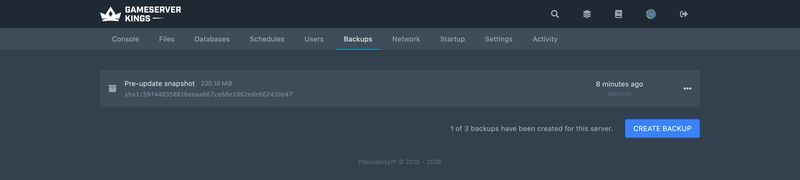
The rollback is the risky step — a wrong radius or time window can do more damage than the griefer. Trigger a manual backup from the Backups tab first. If the rollback goes wrong,
/co undois your first option and the fresh backup is your second. Scheduling is covered in Managing your Minecraft server and How to create a backup.
Incident Runbook
- Stop the bleeding. If the griefer is still online, kick or ban them — see Minecraft Whitelist and Ban Management. If fire is spreading,
/stopfire. - Take a manual backup, before you change anything.
- Identify.
/co i, then click a damaged block. Or/co lookup u:<suspect> t:6h r:#global #countto size it up. - Scope it.
t:must reach back past the first damaged block;r:must cover all of it. - Preview.
/co rollback u:<griefer> t:<window> r:#global #preview. - Commit the same command without
#preview, then check the result./co undoif it is wrong. - Prevent. Region the rebuilt area with
/rg define, add the owners, and consider/rg flag __global__ passthrough denyif the map should not be open ground.
Common Issues
/co rollbackonly fixed a small area. Nor:was given, so it used the default radius of 10. Re-run withr:#globalor a number./co lookupreturns nothing for an old incident. It is past your purge retention, or predates the CoreProtect install. Nothing logged before install exists.- WorldGuard will not load. WorldEdit is missing, or you are on a server type that cannot run Bukkit plugins.
- A region does not protect anything. Its
passthroughflag isallow, or a higher-priority overlapping region is overriding it./rg infoand/rg flagsshow both. - Members cannot build in their own region. Look for an overlapping region they are not a member of — a player must be permitted in all of them. Or
buildhas been set todeny, which blocks members too. - Creepers still blow holes despite a region.
creeper-explosioncovers the region;mob_griefing falsecovers the whole world. Pick the scope you want.
FAQ
Can I roll back griefing that happened before I installed CoreProtect?
No. CoreProtect can only replay what it logged, and it starts logging when it starts running. For anything earlier, a world backup from before the incident is the only option.
How far back can CoreProtect roll back?
As far as your data goes, which is set by how often you purge — /co purge t:30d leaves a 30-day window. The log grows continuously, so the window is a deliberate trade against disk usage.
Will a rollback undo stolen items?
Container transactions are logged, so a:container rollbacks restore items taken from chests. Items already carried away in a player's own inventory are a different matter — a:inventory records those movements, but a rollback acts on the world, not on hunting items down across the map.
Do I need both?
They do different jobs and most established servers run both. CoreProtect is the higher priority: without it an incident is unrecoverable, whereas without WorldGuard it is merely repeatable.
Does WorldGuard work on a Forge or Fabric server?
No. WorldGuard requires the Bukkit API, meaning Paper, Spigot or Purpur. Forge, Fabric and Sponge are explicitly unsupported.
How do I let players claim land themselves?
WorldGuard has a /rg claim mode for self-serve regions, and GriefPrevention is the long-standing alternative built entirely around that idea — the self-service anti-griefing plugin since 2011, supporting Spigot, Paper and Purpur.
Does CoreProtect slow the server down?
It writes through a background consumer queue rather than on the main thread, and the busiest servers in the game run it. Profile before assuming — see Diagnosing Minecraft Server Lag.
What to Read Next
- CoreProtect: Logging, Lookups and Rollbacks for Minecraft — every parameter, hashtag, permission and storage backend
- Minecraft WorldGuard: Region Protection Explained — priorities, parents, region groups, claiming and the full flag list
- How to Start a Minecraft Factions Server — where WorldGuard stops and the Factions plugin's own claims take over
- Minecraft WorldEdit: Selections, Brushes and Schematics — selections, brushes, schematic files and per-player limits
- How to install plugins for Minecraft Java Edition for installing CoreProtect, WorldGuard and WorldEdit
- Managing your Minecraft server for backup scheduling — the layer neither plugin replaces
- Minecraft Whitelist and Ban Management for keeping the griefer out afterwards
- How to Make a Minecraft SMP Server for Friends — whitelist, backups and grief tools sized for a small group
- Minecraft Server Commands for game rules and the safe manual backup sequence
- Minecraft server.properties: The Complete Reference for
spawn-protectionand the rest of the file - How to create a backup for the panel backup workflow in detail
Made with 💜 by GameServerKings

Need a Minecraft server?
Deploy an instantly-provisioned Minecraft server on high-clock hardware — DDoS protected, no contracts, cancel anytime.
From $4.80 /month