Minecraft server.properties: The Complete Reference
Every server.properties key for Minecraft Java 26.3 — type, default, range and what each does, grouped by job, plus the settings that moved to game rules.
server.properties is the main configuration file for a Minecraft Java Edition server. It holds 69 settings covering world generation, player access, view distance, ports, remote administration and resource packs. This page documents every one of them — type, default, valid range and what it actually does — grouped by the job it does rather than alphabetically, so you can find the setting you need without knowing its name first.
For first boot, the EULA and connecting to your server, start with Getting started with your Minecraft server. For the commands referenced throughout this page, see Minecraft Server Commands.
This reference is current for Java Edition 26.3
The key list, types and defaults below are those of 26.3, the current release. Java Edition renumbered its releases in 2026, so versions now look like
26.2rather than1.x— Getting started explains the numbering. Keys are added and removed almost every drop; section 13 lists the ones older guides still tell you to set. Bedrock Edition uses a different and incompatibleserver.propertieswith its own key set — that file is documented separately in Minecraft Bedrock server.properties: The Complete Key Reference.
1. How the File Works
server.properties lives in your server's working directory — the root folder you see in the panel's File Manager. It is plain UTF-8 text in Java properties format: one key=value pair per line, # starts a comment, and every value is stored as a string even when the server reads it back as a number or a boolean.
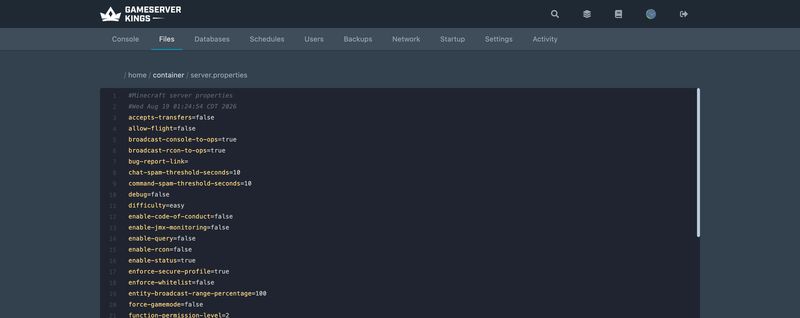
The server rewrites the file on every startup. That process is worth understanding, because it explains most of the confusion people have with this file:
- If the file exists, existing values are read out of it. Comments are discarded.
- Any key that is missing, or has a value the server cannot parse, is reset to its default.
- Keys the server does not recognise are left exactly as they are and written straight back out.
- The file is written back out in UTF-8, with a fresh timestamp comment on line two.
Changes need a restart, and a typo will not announce itself
Editing
server.propertieswhile the server is running does nothing — the file is read once at startup. Restart from the panel after any change. And a misspelled key usually produces no error message at all: the server does not recognise it, so it is never applied — but step 3 above means it is not removed either. It sits in the file across restart after restart, looking exactly like a setting that is working. So "is my line still there?" is not a useful test, because it always will be; check the spelling against the tables on this page instead. An invalid value is more visible: some are quietly reset to the default on the next rewrite, and some print an error to the console at startup.
A few characters are escaped with a backslash when the server writes the file. You will see this most often on level-type:
level-type=minecraft\:normalThat backslash is written by the server itself and is correct. Leave it alone — minecraft:normal without the escape is also read correctly, and the server will re-add the backslash on the next rewrite either way.
server-portis managed by the panelYour server is bound to the port allocated in the panel's Network tab, and the panel keeps
server-portin sync on boot. Do not edit it by hand. If you need a different or an additional port, allocate it in the panel. This is also why your connection address is often not the Java default of25565.
2. World Generation and the World File
These are read when a world is created. Changing level-seed, level-type or generator-settings on a world that already exists has no effect on terrain that has already generated — you need a new world, or a new level-name, for them to matter. Flat and custom world types lists the level-type and generator-settings values.
| Key | Type | Default | What it does |
|---|---|---|---|
level-name |
string | world |
The world folder name, and the name of the world. If a valid world exists at this path it is loaded; otherwise a new one is generated here. Accepts a relative or an absolute path. Changing it is the standard way to swap between worlds without deleting anything |
level-seed |
string | blank | The world seed. Blank generates a random one. Only used at world creation |
level-type |
string | minecraft:normal |
The world preset. The minecraft: namespace may be omitted. Valid values: minecraft:normal, minecraft:flat, minecraft:large_biomes, minecraft:amplified, minecraft:single_biome_surface |
generator-settings |
string | {} |
JSON customising world generation. What it accepts depends on level-type — for minecraft:flat it defines the layers |
generate-structures |
boolean | true |
Whether structures such as villages, temples and strongholds generate in new chunks. Note that dungeons still generate even when this is false |
max-world-size |
integer (1–29999984) | 29999984 |
Distance in blocks from world centre to the world border. Values above the default do nothing — it is the hard engine limit. Lowering it caps how far /worldborder can be pushed |
hardcore |
boolean | false |
Enables hardcore mode on created worlds: difficulty is locked to hard and death is permanent |
Use
level-nameto switch worlds instead of deleting themSetting
level-name=world2makes the server generate and load a fresh world in aworld2folder, leaving the originalworldfolder untouched on disk. Point it back toworldto return. This is far safer than deleting a world folder, and it is the cleanest way to test a new seed. Take a backup first regardless — see Managing your Minecraft server.
3. Gameplay Defaults
| Key | Type | Default | What it does |
|---|---|---|---|
gamemode |
string | survival |
The game mode new players join in. Valid values: survival, creative, adventure, spectator. Legacy numbers 0–3 are silently converted |
force-gamemode |
boolean | false |
false — players rejoin in whatever mode they logged out in. true — every player is switched to gamemode on join, every time |
difficulty |
string | easy |
Mob damage, hunger and poison behaviour. Valid values: peaceful, easy, normal, hard. Legacy numbers 0–3 are silently converted |
spawn-protection |
integer | 16 |
Radius of the build-protected area around world spawn, as a square of side 2x+1. 16 protects 33×33 blocks; 1 protects 3×3; 0 disables it. Only players at permission level 1 or higher can build inside it. If no ops are set, spawn protection disables itself automatically |
4. Players, Access and Permissions
| Key | Type | Default | What it does |
|---|---|---|---|
max-players |
integer (0 – 2³¹−1) | 20 |
Concurrent player cap. On a rented server this is bounded by your slot purchase. Ops with bypassesPlayerLimit set in ops.json can join a full server |
white-list |
boolean | true |
Whether the whitelist is enforced. When on, only players listed in whitelist.json may connect. Ops are whitelisted automatically. This default changed from false to true in 26.3 — see section 12 |
enforce-whitelist |
boolean | false |
What happens to players already online when the whitelist is reloaded. false — they stay connected. true — anyone not on the list is kicked |
online-mode |
boolean | true |
Whether connecting players are verified against Mojang's account database. Leave this true. Setting it false ("cracking" the server) lets anyone join under any username, including someone claiming to be you |
enforce-secure-profile |
boolean | true |
Requires players to have a Mojang-signed public key. With it off, all chat is unsigned and unreportable, and clients show a warning when connecting |
prevent-proxy-connections |
boolean | false |
Kicks players whose ISP/AS as seen by the server differs from the one Mojang's authentication server reports — a rough VPN and proxy filter |
accepts-transfers |
boolean | false |
Whether the server accepts players sent by another server's transfer packet. false rejects the transfer and disconnects the player. Relevant if you run a multi-server network |
op-permission-level |
integer (0–4) | 4 |
The permission level written into ops.json when you run /op. It is the default for newly created ops, not a server-wide ceiling — existing operators keep the level already stored against them |
function-permission-level |
integer (1–4) | 2 |
The permission level that datapack functions run at. Raise it only if a datapack genuinely needs level 3 or 4 commands |
allow-flight |
boolean | false |
Whether survival-mode flight from a client mod is tolerated. false kicks players who stay airborne for roughly five seconds. Has no effect in creative mode, and no effect on elytra or levitation |
white-list=truealone does not kick anyoneTurning the whitelist on stops new non-whitelisted connections, but players already online stay connected until they disconnect. Set
enforce-whitelist=trueas well if you want the list applied to the players who are already in the world. Manage entries with/whitelist add,/whitelist removeand/whitelist reload— see Minecraft Server Commands.
The five permission levels themselves (0 operator, 1 moderator, 2 gamemaster, 3 admin, 4 owner), which commands each unlocks, and how to edit a per-player level in ops.json are documented in Minecraft Op Permission Levels: 0 to 4 Explained. For the commands themselves, see Minecraft Server Commands.
5. Moderation, Anti-Spam and Idle Handling
| Key | Type | Default | What it does |
|---|---|---|---|
player-idle-timeout |
integer | 0 |
Minutes a player may idle before being kicked. 0 never kicks. The idle timer resets on almost any deliberate action — moving items, using an item, swinging, chatting, interacting, updating a sign |
chat-spam-threshold-seconds |
integer | 10 |
Budget for the automatic chat-spam kick, decremented once per tick (1/20 s). Raise it to be more permissive; 0 disables the kick entirely. Added in 26.2 |
command-spam-threshold-seconds |
integer | 10 |
The same mechanism for commands rather than chat messages. 0 disables it. Added in 26.2 |
rate-limit |
integer | 0 |
Maximum packets a player may send before being kicked. 0 disables the limit. A blunt instrument — legitimate clients on a poor connection can trip a low value |
enable-code-of-conduct |
boolean | false |
When true, the server looks for a codeofconduct subfolder next to server.properties and shows joining players the file matching their language. Files are named <language_code>.txt, for example en_us.txt. If the player's language has no file, en_us.txt is used; if that is missing too, any available file is shown |
6. Performance and Ticking
These are the settings that actually move the needle on tick rate. For diagnosing why a server is slow before you start changing numbers, see Managing your Minecraft server.
| Key | Type | Default | What it does |
|---|---|---|---|
view-distance |
integer (3–32) | 10 |
How much world data the server sends each client, as a chunk radius. This is the server-side ceiling — a client asking for more is capped here |
simulation-distance |
integer (3–32) | 10 |
Chunk radius within which entities, redstone and crops actually tick. Entities outside it are neither updated nor visible. This is usually the more expensive of the two |
entity-broadcast-range-percentage |
integer (10–1000) | 100 |
How far away entities are sent to clients, as a percentage of the normal distance. 50 halves it. Lower values cut bandwidth and client load on entity-heavy servers |
max-tick-time |
integer (−1, or 0 – 2⁶³−1) | 60000 |
Milliseconds a single tick may take before the watchdog declares the server crashed, kills it, and exits with code 1. -1 disables the watchdog entirely |
max-chained-neighbor-updates |
integer | 1000000 |
Cap on consecutive block-neighbour updates before further ones are skipped. A guard against redstone contraptions locking the tick. Negative values disable the limit |
pause-when-empty-seconds |
integer | 60 |
Seconds with no players online before the server pauses ticking. Cuts idle CPU to almost nothing. Set it high, or to a value you are sure exceeds your gaps, if you rely on farms or timers running while nobody is on |
sync-chunk-writes |
boolean | true |
Writes chunk data synchronously, which protects against world corruption on a crash at the cost of I/O throughput. Leave it on |
region-file-compression |
string | deflate |
Compression for region files. Valid values: deflate, lz4, none. lz4 trades disk space for less CPU per chunk write. Chunks are not automatically recompressed when changed, so switching algorithms on an existing world applies gradually rather than all at once |
Lower
simulation-distancebeforeview-distanceThey look interchangeable and are not.
view-distancemostly costs bandwidth and client memory;simulation-distancecosts server CPU on every single tick, because it decides how many entities and blocks are being simulated. Dropping simulation to6while leaving view at10keeps the world looking the same size to players while cutting a large slice of the tick cost.
Do not disable the watchdog to "fix" crashes
Setting
max-tick-time=-1stops the server killing itself after a 60-second tick, but a tick that long means something is badly wrong — a corrupted chunk, a runaway contraption or a broken plugin. Disabling the watchdog hides the symptom and lets a wedged server sit there accepting connections it cannot serve. Profile it instead.
7. Networking and Ports
| Key | Type | Default | What it does |
|---|---|---|---|
server-port |
integer (1 – 65534) | 25565 |
The TCP port the server listens on. Managed by the panel — do not edit by hand |
server-ip |
string | blank | Which local IP address to bind to. Blank binds to all available addresses, which is what you want. Leave it empty |
network-compression-threshold |
integer | 256 |
Packets of this many bytes or more are compressed. -1 disables compression; 0 compresses everything. Values below 64 are pointless because Ethernet pads short frames to 64 bytes anyway, and going above the typical 1500-byte MTU is not recommended |
use-native-transport |
boolean | true |
Uses Linux-optimised packet send/receive paths. Leave it on — your server is running on Linux |
8. Server List and Status
| Key | Type | Default | What it does |
|---|---|---|---|
motd |
string | A Minecraft Server |
The line shown under your server's name in the client's multiplayer list (MOTD, server icon and player count). Supports colour and formatting codes and non-ASCII characters. Keep it to 59 characters or fewer — longer MOTDs can make the server list report a communication error |
enable-status |
boolean | true |
Whether the server answers status pings. Set to false and the server shows as offline in the client list while still accepting connections normally |
hide-online-players |
boolean | false |
Omits the player list from status responses. The player count still shows; the names do not |
bug-report-link |
string | blank | URL used for the client's report_bug server link. Left blank, no link is offered |
9. Remote Access: RCON, Query, JMX and the Management Protocol
Four separate remote-administration mechanisms, all off by default. On a rented server you rarely need any of them — the panel's Console tab already gives you authenticated command access — but they are here when you want to script against the server.
RCON
Setting it up, and why it must never face the internet, is covered in How to Set Up RCON on a Minecraft Server.
| Key | Type | Default | What it does |
|---|---|---|---|
enable-rcon |
boolean | false |
Enables RCON, a TCP protocol for running console commands remotely |
rcon.port |
integer (1 – 65534) | 25575 |
TCP port RCON listens on |
rcon.password |
string | blank | RCON password. If RCON is enabled and this is blank, RCON refuses to start — a deliberate safeguard |
broadcast-rcon-to-ops |
boolean | true |
Whether output from RCON commands is echoed to online operators |
RCON is unencrypted
Every byte between an RCON client and the server travels in plain text, including the password on connect. Anyone able to observe the traffic can capture it and take full control of your server. Only use RCON over localhost or an otherwise trusted private network, never across the open internet, and never reuse a password you use elsewhere. If you just want to run commands remotely, use the panel console instead.
Query
| Key | Type | Default | What it does |
|---|---|---|---|
enable-query |
boolean | false |
Enables the UDP query protocol, which reports the MOTD, game type, version, map name, current and maximum player counts, the plugin list and the full list of online player names. Used by server-list sites and status bots |
query.port |
integer (1 – 65534) | 25565 |
UDP port query listens on. Note the default matches server-port, and that on a rented server the panel allocation governs which ports you can actually use |
JMX Monitoring
| Key | Type | Default | What it does |
|---|---|---|---|
enable-jmx-monitoring |
boolean | false |
Exposes an MBean named net.minecraft.server:type=Server with averageTickTime and tickTimes attributes, in milliseconds. Enabling it here is only half the job — the JVM also needs its own JMX flags before anything is reachable |
Management Protocol
Added across the 1.21.9 and 1.21.11 development cycles, the Minecraft Server Management Protocol is a JSON-RPC 2.0 API over WebSocket for managing a server programmatically. It is a newer and better-designed alternative to RCON: authenticated with a bearer token and TLS-encrypted by default.
| Key | Type | Default | What it does |
|---|---|---|---|
management-server-enabled |
boolean | false |
Enables the management API |
management-server-host |
string | localhost |
Host the API binds to |
management-server-port |
integer | 0 |
Port the API listens on. 0 means a random port is chosen at startup — set a fixed number if you intend to connect to it |
management-server-secret |
string | blank | The bearer token clients must present. Exactly 40 alphanumeric characters. Left blank, the server generates one and writes it back into server.properties on startup |
management-server-allowed-origins |
string | blank | Comma-separated list of origins permitted to connect. Requests without a matching Origin header are rejected with 401. Left empty, no browser client can connect at all. Entries need not be valid URLs or domains |
management-server-tls-enabled |
boolean | true |
Whether the API uses TLS. The server will not start if TLS is on and no keystore is configured |
management-server-tls-keystore |
string | blank | Path to the TLS keystore. Must be PKCS12 format |
management-server-tls-keystore-password |
string | blank | Keystore password. Can also be supplied, in descending priority, by the MINECRAFT_MANAGEMENT_TLS_KEYSTORE_PASSWORD environment variable or the -Dmanagement.tls.keystore.password= JVM argument — both preferable to writing a password into a config file |
status-heartbeat-interval |
integer | 0 |
How often the management server sends heartbeat notifications to connected clients. 0 disables heartbeats |
Enabling the management server can stop the server booting
management-server-tls-enableddefaults totrue, and a TLS-enabled management server with no keystore configured refuses to start the whole server. If you turnmanagement-server-enabled=trueand your server then fails to boot, this is why. Either provide a PKCS12 keystore viamanagement-server-tls-keystore, or setmanagement-server-tls-enabled=falseand keep the API bound tolocalhost. Note also thatmanagement-server-allowed-originsis written into the generated file but is not yet listed in the wiki's own property table — it is documented on the protocol page instead.
10. Resource Packs and Datapacks
| Key | Type | Default | What it does |
|---|---|---|---|
resource-pack |
string | blank | Direct download URL for a server resource pack. Players are prompted to accept it on join. Maximum size 250 MiB. Download success or failure is logged by the client, not the server, so a broken URL produces nothing in your console |
resource-pack-sha1 |
string | blank | SHA-1 digest of the pack, lowercase hex. Strongly recommended: it lets clients verify and cache the pack. A mismatch prints Invalid sha1 for resource-pack-sha1 in the console at startup |
resource-pack-id |
string (UUID) | blank | Optional hyphenated UUID identifying the pack to clients |
resource-pack-prompt |
string | blank | Custom message shown on the resource-pack prompt when require-resource-pack is on. Expects chat-component JSON syntax and may span multiple lines. Blank uses the default wording |
require-resource-pack |
boolean | false |
Disconnects players who decline the resource pack |
initial-enabled-packs |
string | vanilla |
Comma-separated datapacks enabled at world creation. Experimental feature packs must be listed explicitly to be turned on |
initial-disabled-packs |
string | blank | Comma-separated datapacks to leave disabled at world creation |
The
initial-pack settings only apply at world creationBoth
initial-enabled-packsandinitial-disabled-packsare read once, when the world is generated. On an existing world, manage datapacks with/datapack enableand/datapack disableinstead — covered in Minecraft Server Commands.
11. Logging, Console Output and Text Filtering
| Key | Type | Default | What it does |
|---|---|---|---|
log-ips |
boolean | true |
Whether player IP addresses appear in console output and log files. Set to false if you would rather not have player IPs sitting in your logs |
broadcast-console-to-ops |
boolean | true |
Whether console command output is relayed to online operators |
text-filtering-config |
string | blank | Configuration for the chat filtering mechanism. Used internally by Realms; not documented by Mojang and not intended for general use |
text-filtering-version |
integer | 0 |
Format version for text-filtering-config. Valid values are 0 and 1 |
12. The white-list Default Changed in 26.3
white-list now defaults to true — a new server accepts nobody until you add them. Every earlier release, 26.2 included, defaulted to false.
The change first appeared in 26.3 Snapshot 2 and shipped in the 26.3 release on 15 September 2026; Mojang's 26.3 patch notes list it as "The white-list property is now true by default". We generated a file on a clean 26.3 server to confirm it: it writes white-list=true, where 26.2 wrote white-list=false. It is the only default that differs between the two files.
Who this affects
A freshly generated
server.propertieson 26.3 or later has the whitelist on by default, and a new server rejects everyone who has not been added. Existing servers are unaffected — step 1 of the regeneration process copies your existing value forward, so a file that already sayswhite-list=falsekeeps saying it. The servers that will be caught out are new ones, and any server whoseserver.propertiesis deleted or reset. Set the value explicitly rather than leaving it to the default, and this cannot surprise you either way.
13. Removed Keys: What Older Guides Still Get Wrong
Most server.properties guides on the web are years out of date. Putting a removed key in the file does nothing at all — the server does not recognise it, so it is never applied. It is not removed either: the line survives every rewrite and sits in your file indefinitely, which is a large part of why these settings keep getting copied from one guide to the next. There is no warning.
Four settings were not deleted but moved to game rules, which live inside the world save rather than in a config file. Game rules apply immediately and persist across restarts, with no reboot needed:
Old server.properties key |
Removed in | Replacement |
|---|---|---|
pvp |
1.21.9 | /gamerule pvp false |
enable-command-block |
1.21.9 | /gamerule command_blocks_work false |
allow-nether |
1.21.9 | /gamerule allow_entering_nether_using_portals false |
spawn-monsters |
1.21.9 | /gamerule spawn_monsters false |
All four game rules default to true. For one of them that is a behaviour change worth noticing: the old enable-command-block property defaulted to false, so command blocks were off until you enabled them, whereas command_blocks_work is on unless you turn it off.
enableCommandBlocksis the wrong name — it was renamed twiceThis one catches almost everybody, including guides written after the change. 1.21.9 first introduced the rule as
enableCommandBlocks, then renamed it tocommandBlocksEnabledlater in the same development cycle, and 1.21.11 renamed it again tocommand_blocks_workwhen all game rules moved into a registry and switched from camelCase to snake_case. Only the last of those three works on a current server. If you are still running 1.21.9 or 1.21.10, the four rules are spelledpvp,commandBlocksEnabled,allowEnteringNetherUsingPortalsandspawnMonsters. The full renamed list, including the three rules whose meaning was inverted along with the rename, is in Minecraft Server Commands.
These keys were removed outright, with no replacement setting:
| Removed key | Removed in | Notes |
|---|---|---|
spawn-animals |
1.21.2 | Controlled passive mob spawning. Nothing replaced it |
spawn-npcs |
1.21.2 | Controlled villager spawning. Removed in the same snapshot as spawn-animals, and almost always omitted from the guides that do mention spawn-animals |
snooper-enabled |
1.18 | Sent anonymous statistics to Mojang. The snooper service is gone |
max-build-height |
1.17 | Build height is now a property of the world's dimension type |
previews-chat |
1.19.3 | Chat preview, introduced and withdrawn within 1.19 |
announce-player-achievements |
1.12 | Became the announceAdvancements game rule, which 1.21.11 renamed again to show_advancement_messages |
debug and texture-pack also appear in very old guides. Neither exists any more — texture-pack was superseded by resource-pack.
14. The Full Default File
This is exactly what Java Edition 26.3 generates on first startup, with all 69 keys at their defaults. Two values are placeholders here: management-server-secret is randomly generated per server, and line 2 carries the file's generation timestamp.
#Minecraft server properties
#[Generation date and time]
accepts-transfers=false
allow-flight=false
broadcast-console-to-ops=true
broadcast-rcon-to-ops=true
bug-report-link=
chat-spam-threshold-seconds=10
command-spam-threshold-seconds=10
difficulty=easy
enable-code-of-conduct=false
enable-jmx-monitoring=false
enable-query=false
enable-rcon=false
enable-status=true
enforce-secure-profile=true
enforce-whitelist=false
entity-broadcast-range-percentage=100
force-gamemode=false
function-permission-level=2
gamemode=survival
generate-structures=true
generator-settings={}
hardcore=false
hide-online-players=false
initial-disabled-packs=
initial-enabled-packs=vanilla
level-name=world
level-seed=
level-type=minecraft\:normal
log-ips=true
management-server-allowed-origins=
management-server-enabled=false
management-server-host=localhost
management-server-port=0
management-server-secret=[Random text]
management-server-tls-enabled=true
management-server-tls-keystore=
management-server-tls-keystore-password=
max-chained-neighbor-updates=1000000
max-players=20
max-tick-time=60000
max-world-size=29999984
motd=A Minecraft Server
network-compression-threshold=256
online-mode=true
op-permission-level=4
pause-when-empty-seconds=60
player-idle-timeout=0
prevent-proxy-connections=false
query.port=25565
rate-limit=0
rcon.password=
rcon.port=25575
region-file-compression=deflate
require-resource-pack=false
resource-pack=
resource-pack-id=
resource-pack-prompt=
resource-pack-sha1=
server-ip=
server-port=25565
simulation-distance=10
spawn-protection=16
status-heartbeat-interval=0
sync-chunk-writes=true
text-filtering-config=
text-filtering-version=0
use-native-transport=true
view-distance=10
white-list=true15. Recommended Starting Points
There is no universally correct configuration, but these are sane departures from the defaults for three common cases. Everything not listed stays at its default.
white-list=true
enforce-whitelist=true
difficulty=normal
view-distance=10
simulation-distance=10
pause-when-empty-seconds=60max-players=60
view-distance=8
simulation-distance=6
entity-broadcast-range-percentage=75
network-compression-threshold=256
sync-chunk-writes=true
spawn-protection=32view-distance=8
simulation-distance=6
max-tick-time=180000
region-file-compression=lz4
pause-when-empty-seconds=300Change one thing at a time
server.propertiesvalues interact, and several of them cost tick time in ways that are not obvious until the server is full. Change one setting, restart, and watch the result before changing the next. If you are tuning to fix a performance problem rather than to set the server up, profile first — Managing your Minecraft server covers finding the actual cause, which is very often a plugin or an entity pile-up rather than anything in this file.
16. FAQ
Where is server.properties on a rented server?
In the root of your server's file tree. Open your rented Minecraft server in the panel, go to the File Manager, and server.properties is in the top-level listing next to eula.txt and your world folder. Edit it there, save, and restart.
Why did my change not take effect?
Three common causes, in order of likelihood. You did not restart — the file is read once at startup and never again. The key was misspelled, in which case it is never read at all and simply sits there looking correct, or the value was invalid, in which case the server may have reset it to the default. Or the setting only applies at world creation, which is true of level-seed, level-type, generator-settings and both initial-*-packs keys.
Why did my comments disappear?
The server discards comments when it rewrites the file on startup, keeping only its own two header lines. There is no way to preserve your own — keep notes somewhere else.
How do I whitelist players?
Set white-list=true, restart, then add players from the panel console with whitelist add PlayerName (no leading slash in the console). Add enforce-whitelist=true if you also want non-whitelisted players who are already online to be kicked. See Minecraft Server Commands for the full whitelist command set, and Minecraft Whitelist and Ban Management for running the list day to day — editing whitelist.json directly, offline UUIDs, and bans.
Does pvp=false still work?
No. pvp was removed from server.properties in 1.21.9 and is now a game rule. Run /gamerule pvp false in-game as an op, or gamerule pvp false from the panel console once the world has generated.
Should I set online-mode=false?
No. It disables Mojang account verification, which means anyone can connect claiming to be any username — including yours, with your op permissions. It exists for servers with no internet access. Every legitimate use case people reach for it to solve, such as a proxy network, has a proper solution that keeps verification intact.
How many players can max-players actually take?
The setting itself accepts any positive integer, but the real limit is CPU and RAM, and on a rented server your slot allocation. The settings that decide how many players a given machine can carry are view-distance and simulation-distance, not max-players — see section 6.
Can I edit server.properties while the server is running?
You can edit it, but the server will overwrite your changes with its in-memory values the next time it writes the file, and it will not read yours in the meantime. Stop the server, edit, then start it.
17. What to Read Next
- Getting started with your Minecraft server for first boot, the EULA, version numbering and connecting
- Minecraft Server Commands for the full command and game rule reference, including
/whitelistand/gamerule - Minecraft Op Permission Levels: 0 to 4 Explained for
op-permission-level,function-permission-leveland what each level unlocks - Managing your Minecraft server for performance tuning, profiling and backups
- How to install plugins for Minecraft Java Edition for Paper, Spigot and Purpur servers
- How to install mods for Minecraft Java Edition for Forge, Fabric and NeoForge servers
- Setting up CrossPlay for Minecraft to let Bedrock players join a Java server
- Minecraft Bedrock server.properties: The Complete Key Reference for the separate, incompatible Bedrock key set
- Setting up your Bedrock Minecraft server for Bedrock first boot and day-to-day operation
Primary source for every key, type and default on this page: the official Minecraft Wiki server.properties article, cross-checked against Mojang's version manifest for release status, and the wiki's Game rule and Minecraft Server Management Protocol articles. Verified 18 August 2026 against Java Edition 26.2; defaults re-checked 28 September 2026 against a freshly generated 26.3 file.
Made with 💜 by GameServerKings

Need a Minecraft server?
Deploy an instantly-provisioned Minecraft server on high-clock hardware — DDoS protected, no contracts, cancel anytime.
From $4.80 /month