Minecraft Server RAM and JVM Flags: Aikar's Flags and Heap Sizing
How much RAM a Minecraft server really needs, why -Xms should equal -Xmx, plus Paper's Aikar's flags, G1GC tuning and the Java 25 requirement.
"How much RAM does my Minecraft server need?" is the last question most people ask before they pick a plan, and it is usually answered with a number pulled out of the air. This guide answers it properly for Java Edition: what actually consumes heap, how heap sizing works — including how it is handled for you on a GameServerKings server — and the exact garbage-collection flags PaperMC recommends — including the ones you can now pull straight from Paper's own API.
If the question you actually have is how much RAM to give the game on your own PC, that is a different question with a different answer — How Much RAM to Allocate to the Minecraft Launcher covers the client side, and nothing on this page applies to it.
Already lagging? Size the heap second
If your server is already stuttering, memory is only one of several suspects and rarely the first. Measure before you buy: Diagnosing Minecraft Server Lag shows you how to tell a memory problem from a CPU, entity or plugin problem in about five minutes. Come back here once you know it is the heap.
1. How Much RAM a Minecraft Server Actually Needs
There is no single right answer, because three different things drive memory and player count is the weakest of the three. The two most authoritative sources disagree, and the disagreement is instructive:
- The official Minecraft wiki says that for small servers you want "at least 2 GB of RAM available" and "it is very possible that you need 4 GB of RAM for larger servers", with
-Xmx2Gdescribed as "more than enough for a home server with 5 players". - PaperMC says "we recommend using at least 6-10GB, no matter how few players", because G1 — the garbage collector Java uses — "operates better with more memory".
Both are right about different things. The wiki is describing the memory the game genuinely needs; Paper is describing the memory the collector wants in order to stay out of your way. A 2 GB server works. A 2 GB server also spends far more of its life collecting garbage than a 6 GB one, and that shows up as micro-stutter rather than as a crash.
Our starting points, as heap — the memory the Java process is allowed to hand to the game itself. On a GameServerKings plan you choose this figure by choosing the plan, not by editing a flag; section 8 explains why.
| What you are running | Sensible heap | Notes |
|---|---|---|
| Vanilla or Paper, 5-10 players, view-distance 8-10 | 4 GB | Comfortable. 2 GB runs but collects constantly |
| Paper with a normal plugin stack, 10-25 players | 6 GB | Paper's own floor. Most survival servers live here |
| Paper, 25-60 players, several worlds, map/dynmap-style plugins | 8-10 GB | Above this you are usually CPU-bound, not memory-bound |
| A light mod set (Fabric + performance mods, 20-40 mods) | 6-8 GB | |
| A large modpack (150+ mods — All the Mods, Vault Hunters, Create-style packs) | 10-12 GB | Packs publish their own figure. Trust the pack's over ours |
| A Velocity or BungeeCord proxy | 1 GB | A proxy holds almost nothing. See section 9 |
Heap is not the same as your plan's RAM
Every number above is the heap. The Java process needs more than its heap: thread stacks, metaspace, network buffers, the JVM itself. Paper's guidance is blunt about it: "if your host says you have 8GB of memory, do not use 8GB" — wherever you set
-Xmxyourself, reduce it by roughly 1000-1500 MB below the machine's total. Section 4 explains why the alternative is your server being killed rather than merely being slow. On our Minecraft servers you never do that arithmetic: the launch command caps the heap at 95% of the plan's RAM automatically, so a plan sized at the heap figure you want is the whole job. Section 8 has the detail.
2. The Three Things That Actually Drive Memory
View distance and simulation distance
These two server.properties keys are the single biggest lever you own, and they multiply by player count. Both are documented in full in the server.properties reference. The area a player keeps loaded is a square of side 2r + 1 chunks. At the default view-distance=10 that is 21 × 21 = 441 chunks per player. The wiki works the same sum for a five-player server at default simulation distance: 5 × 21² = 2,205 chunks simulated.
Drop view-distance from 10 to 8 and each player loads 289 chunks instead of 441 — a 34% cut in loaded chunks, for a change most players never notice. simulation-distance is the more expensive of the two, because it governs which chunks actually tick entities, crops and redstone rather than merely being sent to the client. Lower simulation distance before you lower view distance.
view-distance=8
simulation-distance=6What the server is running
A vanilla jar, a Paper server with fifteen plugins, and a 200-mod pack are three different applications that happen to share a name. Plugins mostly add heap in proportion to what they cache (a live map renderer, a permissions plugin with a big user table, a logging plugin such as CoreProtect). Mods add heap in proportion to how much new content they register at boot — a large pack can consume 3-4 GB before a single player joins, purely in registries and recipe data.
How big and how busy the world is
An old, heavily built world with thousands of resident entities, dozens of chunk-loading farms and a large explored area costs more than a fresh one at the same player count. This is the memory equivalent of entity creep, and the fix is entity housekeeping — not a bigger plan.
3. Why "More RAM" Is Usually the Wrong Lever
Adding RAM is the first thing people try and the least often correct, for three reasons.
The tick loop is single-threaded. Minecraft processes the world in one thread, and no amount of memory makes that thread faster. Paper says it plainly: "A major source of load in the server comes from the tick loop, which uses a single thread… it's advisable to go for a CPU with high single-threaded performance." If your ticks are slow because 4,000 entities need updating, a bigger heap changes nothing at all.
Past a point, more heap makes pauses longer, not shorter. Every garbage collection has to walk live objects. A larger heap holds more live objects. Paper is explicit that "more memory does not mean better performance above a certain point… going out and getting 32GB of RAM for a server will only waste your money with minimal returns."
High memory usage is not a symptom. Java grows the heap and does not hand it back. Paper's troubleshooting guide is worth quoting in full here: "Unless you're experiencing out of memory crashes or bad garbage collection (GC) times, high memory usage is expected… This is not a memory leak and will not cause out of memory crashes." A panel meter sitting at 90% is normal, not a warning.
What a real memory problem looks like
Two symptoms, and only two. Out-of-memory crashes — the console prints
java.lang.OutOfMemoryError: Java heap space, or the process vanishes and Linux logs a kill. And long GC pauses — periodic freezes not aligned to auto-save, confirmed with/spark gc. Anything else is a different problem wearing memory's coat.
4. -Xms and -Xmx: What They Are
Two flags, placed between java and -jar on the command line, control the heap:
-Xmxis the maximum heap. This is the number everyone means by "how much RAM".-Xmsis the initial heap — how much the JVM claims at startup.
java -Xms6G -Xmx6G -jar paper.jar --noguiOn a GameServerKings server, neither flag is yours to set
Our Minecraft servers launch with
-Xms128M -XX:MaxRAMPercentage=95.0and no-Xmxat all — the heap ceiling is derived from the RAM your plan allocates, automatically. There is noMEMORYfield and noXmxfield on the Startup tab. Read this section to understand what the numbers mean and to size a plan; section 8 covers what you can actually change.
Why they should match
Paper's recommendation is that -Xms and -Xmx be identical, and the reasoning is worth understanding rather than copying:
"You should never run your server with the case that
Xmxcan run the system completely out of memory. Your server should always be expected to use the entireXmx! … Now, that means ifXmsis lower thanXmxyou have unused memory! Unused memory is wasted memory. G1 operates better with the more memory it's given."
The short version: you must already be able to survive the server using its full -Xmx, or that -Xmx was set too high in the first place. Given that, starting lower buys nothing and costs you a series of heap-growth pauses during the first hour of uptime.
There is a legitimate dissent. The Minecraft wiki suggests -Xms at about a quarter of -Xmx if the same machine is running other things, so the JVM can return memory to the OS. Your container is yours alone, so that case does not apply, and wherever you control both flags, matching is the right call.
Our own servers deliberately do not match them — -Xms is fixed at 128 MB while the maximum comes from the plan. That trades a handful of heap-growth pauses in the first minutes of uptime for a server that does not claim its entire allocation before anyone has joined. Section 8 covers it.
The overhead nobody budgets for
This is the most common way a Minecraft server dies. Your allocation is the ceiling for the whole container; -Xmx is the ceiling for the heap only. Set them equal and the first time Java uses metaspace and thread stacks on top of a full heap, the container's limit is breached and the process is killed — not gracefully, with no crash report.
The table below applies wherever you set -Xmx by hand — self-hosted, or a host that exposes the field. On our Minecraft plans the same job is done for you by -XX:MaxRAMPercentage=95.0; see section 8.
| Total RAM available | Set -Xmx to |
Headroom left |
|---|---|---|
| 4 GB | 3 GB | 1 GB |
| 6 GB | 4.5-5 GB | 1-1.5 GB |
| 8 GB | 6.5 GB | 1.5 GB |
| 12 GB | 10.5 GB | 1.5 GB |
| 16 GB | 14 GB | 2 GB |
A server that disappears with no crash log is usually this
If the process vanishes and
logs/latest.logsimply stops mid-line, it was killed from outside rather than crashing. Paper's own diagnosis: "A common cause… is that your server panel is configured with a memory limit that's too close to your-Xmx. Either reduce-Xmx(by 1-2GB is a good initial rule of thumb) or increase… the memory limits." Lower-Xmxfirst; only then consider a larger plan. On a GameServerKings server the first of those two is not available to you — the heap ceiling is a percentage of your allocation and moves with it — so the second one is the lever.
5. Aikar's Flags
Beyond heap size, the JVM's garbage collector can be tuned for Minecraft's very unusual allocation pattern — Paper measures it at "at least 800MB/second on a 30 player server", nearly all of it short-lived objects. The tuned flag set for this is known as Aikar's flags, and it remains PaperMC's official recommendation, published in their documentation to this day.
java -Xms10G -Xmx10G -XX:+UseG1GC -XX:+ParallelRefProcEnabled -XX:MaxGCPauseMillis=200 \
-XX:+UnlockExperimentalVMOptions -XX:+DisableExplicitGC -XX:+AlwaysPreTouch \
-XX:G1NewSizePercent=30 -XX:G1MaxNewSizePercent=40 -XX:G1HeapRegionSize=8M \
-XX:G1ReservePercent=20 -XX:G1HeapWastePercent=5 -XX:G1MixedGCCountTarget=4 \
-XX:InitiatingHeapOccupancyPercent=15 -XX:G1MixedGCLiveThresholdPercent=90 \
-XX:G1RSetUpdatingPauseTimePercent=5 -XX:SurvivorRatio=32 -XX:+PerfDisableSharedMem \
-XX:MaxTenuringThreshold=1 -Dusing.aikars.flags=https://mcflags.emc.gs \
-Daikars.new.flags=true -jar paper.jar --noguiChange exactly two things. Replace 10G in both -Xms and -Xmx with your own figure from section 4, and replace paper.jar with your jar's filename. Everything else is deliberate and should be pasted as-is. The two -D properties are not tuning knobs — they are system properties that mark the server as running this flag set, so anyone reading a report or a support thread can see it at a glance.
Which parts of this line transfer to a GameServerKings server
The eighteen
-XX:tuning flags and the two-Dmarkers transfer exactly as published, and we will apply them to your server on request. The-Xms10G -Xmx10Gat the front is the one part you cannot apply as written: our launch command sets-Xms128Mand derives the maximum from your plan's RAM, and the Startup tab exposes no field for either.-jar paper.jaris already handled too — the jar name comes from the Server Jar File variable. Section 8 has the mechanics.
The flags are now machine-readable
You no longer have to trust a copy of the list on a blog. Paper publishes the recommended flags per Minecraft version as JSON, so you can check what your exact version is supposed to be running:
curl -s https://fill.papermc.io/v3/projects/paper/versions/26.2{
"version": {
"id": "26.2",
"support": { "status": "SUPPORTED" },
"java": {
"version": { "minimum": 25 },
"flags": {
"recommended": [
"-XX:+AlwaysPreTouch", "-XX:+DisableExplicitGC",
"-XX:+ParallelRefProcEnabled", "-XX:+PerfDisableSharedMem",
"-XX:+UnlockExperimentalVMOptions", "-XX:+UseG1GC",
"-XX:G1HeapRegionSize=8M", "-XX:G1HeapWastePercent=5",
"-XX:G1MaxNewSizePercent=40", "-XX:G1MixedGCCountTarget=4",
"-XX:G1MixedGCLiveThresholdPercent=90", "-XX:G1NewSizePercent=30",
"-XX:G1RSetUpdatingPauseTimePercent=5", "-XX:G1ReservePercent=20",
"-XX:InitiatingHeapOccupancyPercent=15", "-XX:MaxGCPauseMillis=200",
"-XX:MaxTenuringThreshold=1", "-XX:SurvivorRatio=32"
]
}
}
}
}Those are the same eighteen tuning flags as the command above. The API deliberately leaves out -Xms, -Xmx and the two -D markers, because those are yours to choose. It also tells you the minimum Java version and whether Paper still supports that Minecraft version at all — swap 26.2 for any version you like.
Sanity-check before you upgrade
"support": { "status": "UNSUPPORTED", "end": "2026-06-15" }is what the same call returns for Paper 1.21.11 today. If you are about to buy a plan for a version, ask the API whether it is still receiving fixes before you build a community on it.
6. What the G1GC Flags Actually Do
You do not need this section to use the flags, but you do need it to argue with anyone who tells you to change one. The explanations are Paper's own:
| Flag | What it is for |
|---|---|
-XX:+UseG1GC |
Selects the G1 collector. G1 is the default on modern Java and is what the rest of the flags tune |
-XX:G1NewSizePercent=30 / -XX:G1MaxNewSizePercent=40 |
The important pair. G1's default new-generation share is 5%; these raise it to 30-40% so Minecraft's "extremely high memory allocation rate" has somewhere to land and short-lived objects die young |
-XX:MaxGCPauseMillis=200 |
A pause goal, not a limit. 200 ms is "aiming for at most loss of 4 ticks", which the server recovers from instantly and players do not perceive |
-XX:G1HeapRegionSize=8M |
Any allocation over half a region is treated as "humongous" and promoted straight to old generation. Left on auto, the calculated value is often too small and a large share of your heap gets treated that way |
-XX:MaxTenuringThreshold=1 |
Stops transient data being copied up to fifteen times through survivor space before it is finally promoted. Cuts young-collection pause times sharply |
-XX:SurvivorRatio=32 |
Follows from the line above — survivor space is barely used now, so give the space back to eden |
-XX:G1ReservePercent=20 |
Doubles G1's default reserve to guard against "the dreaded 'to-space exhaustion'" under Minecraft's allocation rate |
-XX:+DisableExplicitGC |
Ignores plugins that call System.gc(). Each such call triggers a full collection and "a massive lag spike" |
-XX:+AlwaysPreTouch |
Claims and touches the whole heap at startup so it is contiguous. Costs a slower boot, buys steadier runtime |
-XX:+ParallelRefProcEnabled |
Uses multiple threads for weak-reference processing during collection |
-XX:+PerfDisableSharedMem |
Stops the JVM writing performance counters to the filesystem, which can stall the process when disk I/O is busy |
-XX:G1MixedGCLiveThresholdPercent=90, -XX:G1MixedGCCountTarget=4, -XX:G1HeapWastePercent=5, -XX:InitiatingHeapOccupancyPercent=15, -XX:G1RSetUpdatingPauseTimePercent=5 |
Collectively make old-generation cleanup earlier, smaller and more frequent, so you never hit a full collection |
Do not mix flag sets
ZGC, Shenandoah and various "ultimate flags" lists circulate widely, and some of them are fine in isolation. What is never fine is pasting one list on top of another.
-XX:+UseZGCwith G1-specific flags still present will either refuse to start or silently ignore half of what you set. Pick one set, use all of it, change nothing.
7. Which Java Version You Need
This changed recently and catches people mid-upgrade. Minecraft moved to year-based version numbers in 2026, and the Java requirement moved with it.
| Minecraft / Paper version | Java required |
|---|---|
| 26.1 and newer | Java 25 |
| 1.20 - 1.21.11 | Java 21 |
| 1.17 - 1.19 | Java 17 |
| 1.12 - 1.16.4 | Java 11 |
Verified against both Paper's version table ("Paper requires at least Java 25 to run") and the Minecraft wiki ("Minecraft ≥ 26.1 and above requires Java 25"), so this applies to the vanilla jar as well as to Paper and its forks. Older Minecraft versions run happily on newer Java; the requirement is a floor, not a match. If you are moving an existing world up onto a 26.x jar, do it in the order set out in Updating Your Minecraft Server — the Java change and the world upgrade have to happen together.
Getting it wrong produces one unmistakable error on boot:
Exception in thread "ServerMain" java.lang.UnsupportedClassVersionError: net/minecraft/bundler/Main
has been compiled by a more recent version of the Java Runtime (class file version 69.0),
this version of the Java Runtime only recognizes class file versions up to 65.0class file version 69.0 means the jar was built for Java 25, and 65.0 is the Java 21 runtime trying to run it — add 44 to a Java version to get its class file version. Paper is friendlier about it: its launcher tests the runtime before loading anything and exits with Minecraft 26.1 and newer requires running the server with Java 25 or above rather than a stack trace. Either way the fix is the same — select a newer Java image in the Startup tab rather than change anything about the jar. There is more on the 2026 numbering in Getting started with your Minecraft server.
8. Where the Flags Go on a GameServerKings Server
Our Minecraft servers never ask you for a heap size, because the launch command does not contain one. This is what the Startup tab shows, and the command box itself is read-only:
java -Xms128M -XX:+IgnoreUnrecognizedVMOptions -XX:MaxRAMPercentage=95.0 \
  -Dterminal.jline=false -Dterminal.ansi=true \
  -jar server.jar \
  $EXTRA_FLAGS          # whatever you type into the Extra Flags field, appended last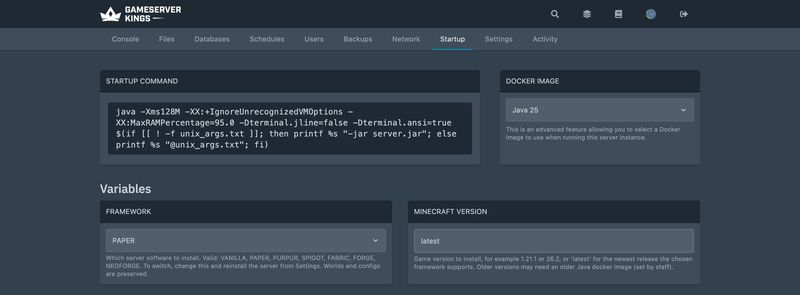
There is no -Xmx, and there is no MEMORY variable. The complete list of variables you can edit is Framework, Minecraft Version, Build Number, Server Jar File, Extra Flags and Accept Mojang EULA. (Forge and NeoForge substitute @unix_args.txt for -jar server.jar, because modern versions of those loaders launch from an arguments file; the rest of the line is identical.)
How the heap gets sized instead
-XX:MaxRAMPercentage=95.0 caps the heap at 95% of the memory available to the JVM. Oracle's specification for the java launcher defines that as "the minimum of the machine's physical memory and any constraints set by the environment (e.g. container)" — and your server is a container whose constraint is the RAM on your plan. So:
| Your plan's RAM | Maximum heap you get |
|---|---|
| 4 GB | ~3.8 GB |
| 6 GB | ~5.7 GB |
| 8 GB | ~7.6 GB |
| 12 GB | ~11.4 GB |
| 16 GB | ~15.2 GB |
The lever is the plan, not a flag. If section 1 puts your setup at a 6 GB heap, buy a plan with about 6 GB of RAM and you have it. If you are hitting OutOfMemoryError, more memory is the fix, because you cannot raise a ceiling that is defined as a percentage of your allocation.
That leaves 5% for the JVM's non-heap overhead — metaspace, thread stacks, GC bookkeeping, direct byte buffers. It is a thinner margin than the 1000-1500 MB Paper recommends, and the reason it is workable is that Paper's figure is written for a machine you administer, where the operating system has to live inside the same budget. Your container's limit covers the Java process and nothing else. If you run an unusually heavy modpack and the process is killed with no crash log, that margin is the first thing to mention when you open a ticket.
-Xms is fixed at 128 MB
This is the one place we knowingly depart from the advice in section 4. A 128 MB initial heap means the JVM grows into your plan's memory over the first minutes of uptime instead of claiming all of it at boot. You trade a few heap-growth pauses early on for a server that is not sitting on its whole allocation before a player has joined. It is not editable from the Startup tab.
What Extra Flags is — and what it is not
Extra Flags is the one part of the launch line you can edit, and where it lands matters. Look at the command again: it sits at the end, after -jar server.jar. Oracle's specification for the java launcher is unambiguous about that position — "Arguments following… -jar jarfile… are passed as arguments to the main class." Paper documents the same boundary from its own side: "CLI arguments are always added directly after the server file name."
So Extra Flags is a slot for server arguments, not JVM flags. Valid values look like this:
--safeMode
--nogui
--world myworld--safeMode is the one worth remembering: it loads worlds with only the vanilla datapack enabled, which is how you recover a world that refuses to load with Missing data pack paper after switching the Framework away from Paper or Purpur. Clear the field again once the world is back. Paper's CLI arguments reference lists the full set. The field takes up to 120 characters.
Putting
-Xmxin Extra Flags will not give you more memoryIt cannot. By that point on the command line the JVM has already been configured, and everything after the jar name is handed to the Minecraft server as an argument instead. The
-XX:+IgnoreUnrecognizedVMOptionsyou can see in the command is not a safety net for this either — it governs the VM-options section, which is the part before-jar, and it never sees what you typed. What each of the seven frameworks then does with an argument it does not recognise varies, so the only safe advice is not to put JVM flags there at all. Ask us instead.
Getting Aikar's flags applied
The eighteen tuning flags belong in the VM-options section of the command line, which is staff-editable rather than customer-editable. Open a ticket naming the flag set you want and we will set it on your server — the same way the backup allowance is handled in How to Create a Backup. Restart after any change; the JVM reads these once, at launch.
Confirm the flags are live
After the restart,
/spark health --memoryin the console reports the JVM's actual state, and/spark gcshows collection counts and average pause times. If pause times drop and the count per minute falls, the flags took effect. Diagnosing Minecraft Server Lag covers both commands in detail.
9. Modded Servers, Proxies and Forks
Modded servers (Forge, Fabric, NeoForge) use the same G1 flags; they simply need more heap, which on our platform means a larger plan. Follow the pack's published figure — pack authors have measured theirs and you have not. If the pack does not state one, start at 8 GB and watch /spark health --memory for a week. How to Install a Minecraft Modpack Server covers pack-specific sizing, and How to install mods for Minecraft Java Edition covers loader choice.
Velocity and BungeeCord proxies do not get Aikar's flags. A proxy forwards packets; it holds no world, no entities and no chunks, so its allocation pattern is nothing like a game server's. Paper's fill API returns an empty recommended-flag list for Velocity, and Velocity's own documentation ships a much shorter startup line:
java -Xms1G -Xmx1G -XX:+UseG1GC -XX:G1HeapRegionSize=4M -XX:+UnlockExperimentalVMOptions \
-XX:+ParallelRefProcEnabled -XX:+AlwaysPreTouch -XX:MaxInlineLevel=15 -jar velocity.jarNote the 1 GB heap and the 4 MB region size — both the opposite of what a game server wants. Velocity 4.0.0 requires Java 25; the still-supported 3.5.1 line requires Java 21.
Folia, Paper's regionised-threading fork, does take the same eighteen flags — Paper's API returns an identical list for it. Folia exists to spread the tick loop across cores for servers whose players are spread across a large world, and it is a different project from Paper with different plugin compatibility; it is not a drop-in performance patch. Minecraft Server Software Compared covers where each of these fits.
10. FAQ
How much RAM does a Minecraft server need?
For a Paper server with a normal plugin stack and 10-25 players, 6 GB of heap is a good target — that is also PaperMC's own floor, which they state applies "no matter how few players". A small vanilla or Paper server runs fine on 4 GB. Large modpacks want 10-12 GB. On a GameServerKings plan the heap is capped at 95% of the plan's RAM for you, so buy the plan at roughly the heap figure you want; where you set -Xmx by hand instead, leave 1-1.5 GB of the machine's RAM outside the heap for the JVM itself.
Should -Xms and -Xmx be the same?
Yes, on a dedicated game server. Paper's reasoning is that you must already be able to afford the server using its full -Xmx, so anything below that is memory sitting idle — and G1 makes better decisions with more of the heap available from the start. Matching them also avoids a run of heap-growth pauses during the first hour of uptime. On our Minecraft servers the question does not arise: there is no -Xmx to match, and -Xms is fixed at 128 MB. See section 8.
Are Aikar's flags still relevant?
Yes. They are published on docs.papermc.io as Paper's recommendation, and the same eighteen tuning flags are served as machine-readable JSON from fill.papermc.io for current Minecraft versions including 26.2 — which is about as current an endorsement as a flag set can get.
Will more RAM fix my lag?
Usually not. The Minecraft tick loop runs on a single thread, so if ticks are slow because of entity count, redstone, chunk loading or a heavy plugin, extra heap changes nothing. Memory is the cause only when you see out-of-memory crashes or long GC pauses. Diagnose first — Diagnosing Minecraft Server Lag shows how.
Why does my server show 90% memory usage all the time?
Because that is how Java works. The heap grows and the collector rarely returns memory to the operating system, so the figure climbs and stays there. Paper describes high memory usage as "expected" and "not a memory leak". Only out-of-memory crashes and poor GC times are actual problems.
What Java version do I need for Minecraft 26.2?
Java 25. Every Minecraft release from 26.1 onwards requires it, for the vanilla jar and for Paper alike. Versions 1.20 through 1.21.11 need Java 21. Running the wrong one produces an UnsupportedClassVersionError on boot.
11. What to Read Next
- Diagnosing Minecraft Server Lag for TPS, MSPT and the spark profiler
- Minecraft Server Software Compared for choosing between Vanilla, Paper, Purpur, Fabric, Forge and NeoForge
- Updating Your Minecraft Server for moving a live world onto a newer version and Java runtime
- Getting started with your Minecraft server for the Startup tab, server types and the 2026 version numbering
- Minecraft server.properties: The Complete Reference for
view-distance,simulation-distanceand every other key - How to Install a Minecraft Modpack Server for pack-specific memory figures
- How to install mods for Minecraft Java Edition for loader choice
- Plugins for the plugin stack that shapes your heap
- How Much RAM to Allocate to the Minecraft Launcher for the client-side question this page is constantly confused with
- Managing your Minecraft server for backups, rollback and scheduled restarts
- Minecraft Server Commands for the op and gamerule reference
Made with 💜 by GameServerKings

Need a Minecraft server?
Deploy an instantly-provisioned Minecraft server on high-clock hardware — DDoS protected, no contracts, cancel anytime.
From $4.80 /month