Updating Your Minecraft Server: Versions, Snapshots and the 2026 Numbering Change
Minecraft moved to year-based versions in 2026. The 26.x scheme, the Java 25 requirement, safe update steps, world upgrades, snapshots and downgrading.
Minecraft stopped using 1.x version numbers in 2026, which means most of the update advice on the internet — and most people's mental model — is now describing a numbering scheme the game no longer uses. This guide covers the new scheme, how to update your Minecraft server safely, what happens to your world when you do, why 26.1 and newer will refuse to start on the Java runtime that ran 1.21, and what your options are when you need to go backwards.
If a drop has just landed and you want the short ordered version to work through today rather than the reasoning behind it, that is Minecraft Update Day Checklist. This page is the detail behind each of its steps.
1. Minecraft Changed Its Version Numbers in 2026
The last release to carry the familiar 1. prefix was 1.21.11, in December 2025. From 2026 onwards, Java Edition releases are numbered YY.D.H:
YY— the two-digit yearD— the drop number within that yearH— the hotfix counter for that drop
The first release of a drop carries no hotfix number at all. So the second drop of 2026 is plain 26.2, and its first hotfix would have been 26.2.1.
| Java Edition release | Drop name | Full release |
|---|---|---|
| 26.1 | Tiny Takeover | 24 March 2026 |
| 26.1.1 | Tiny Takeover | 1 April 2026 |
| 26.1.2 | Tiny Takeover | 9 April 2026 |
| 26.2 | Chaos Cubed | 16 June 2026 |
| 26.3 | Wilderness Bound | 15 September 2026 |
As of 28 September 2026 the current Java Edition release is 26.3, and 26.4 is in snapshot — the launcher's version manifest reports 26.4-snapshot-1, published 22 September 2026.
Three to four drops a year, roughly one a quarter
The numbering follows Mojang's drop schedule rather than a "major version" idea. Three to four game drops are released each year on a broadly quarterly cadence, so a year's releases run
26.1,26.2,26.3and sometimes26.4, with hotfixes hanging off each. There is no longer a1.22waiting somewhere; that line ended at 1.21.11.
Bedrock changed too, differently
Bedrock Edition dropped its leading 1. after the 1.21.130 cycle and replaced the major number with the same two-digit year. Its minor number keeps counting the way it always did, which is why Bedrock and Java numbers no longer line up:
| Drop | Java Edition | Bedrock Edition |
|---|---|---|
| Tiny Takeover | 26.1 | 26.10 |
| Chaos Cubed | 26.2 | 26.30 |
| Wilderness Bound | 26.3 | 26.50 |
The current Bedrock release is 26.52 (25 September 2026). One quirk worth knowing if you script downloads: the Bedrock Dedicated Server archive Mojang publishes is still named with the old prefix — the current file is bedrock-server-1.26.52.3.zip. The 1. survives in filenames and in some internal version strings even though the game no longer uses it. Bedrock setup is covered in Setting up your Bedrock Minecraft server.
2. The Java Runtime Is the Part That Actually Breaks
If an update fails, this is usually why. Minecraft raises its minimum Java version periodically, and 2026 was one of those times.
| Minecraft version | Java required |
|---|---|
| 26.1 and later | 25 |
| 1.20.5 to 1.21.11 | 21 |
| 1.18 to 1.20.4 | 17 |
| 1.17 to 1.17.1 | 16 |
| 1.16.5 and older | 8 |
This is a property of Minecraft itself, not of any particular jar, so it applies identically to Vanilla, Paper, Purpur, Folia, Forge, Fabric and NeoForge. Two independent primary sources agree: PaperMC's requirements table lists Java 25 for 26.1+, and Mojang's own per-version metadata — reachable from version_manifest_v2.json — reports javaVersion.majorVersion: 25 for 26.1, 26.2 and 26.3, against 21 for 1.21.11.
Older Minecraft versions generally run fine on a newer Java than they were built for, so a Java 25 runtime is not a problem for a 1.20 server. The reverse is fatal: a 26.x jar on Java 21 will not start.
Change the Java version in the same maintenance window
Moving from a
1.21.xjar to a26.xone is two changes, not one: the server jar and the runtime underneath it. On your panel, the Java runtime is selected in the Startup tab alongside the jar type and version. Set both before you press Start, or the server will fail on boot with an unsupported class version error and you will spend ten minutes blaming the jar.
If you are also running a proxy, check it separately. Velocity 4.0.0 needs Java 25; Velocity 3.5.1 still runs on Java 21.
3. Back Up First. Every Time.
PaperMC's update guide calls this "the most important step, and yet the most frequently skipped", and that matches what support tickets look like. Updating the server software rarely destroys anything by itself — a plugin misbehaving on the new version absolutely can.
Back up before every update:
- Open the Backups tab and create a snapshot. This captures the whole server volume, not just the world.
- If the update is a major one, download that backup off-platform as well.
- Note which jar, Minecraft version and Java version you are currently on, so you know what "back to how it was" means.
The full backup and restore workflow, including scheduling, is in Managing your Minecraft server and How to Create a Backup.
Never swap a jar on a running server
Paper's guidance is blunt: "Unless you know exactly what and why you're doing what you're doing, it's never a good idea to replace any JAR in a running server, be that plugins, or Paper itself." Stop the server, change the version, start it. The panel does this for you when you change the Startup values and restart.
4. Updating a Vanilla, Paper or Purpur Server
The panel handles the jar download, so the update is mostly sequencing.
- Take the backup (section 3).
- Update your plugins first. Download the versions of each plugin that support the Minecraft version you are moving to. On Paper you can stage them: create a folder called
updateinsideplugins/, put the new jars in it, and Paper swaps them in on the next start. Do not remove or modify the plugins outside that folder. - Stop the server.
- Set the new version in the Startup tab, along with the Java version if you are crossing the Java 21 to 25 boundary.
- Start the server and watch the console. Plugin failures, missing dependencies and world upgrade progress all appear here, and they appear early.
- Join and check the things that matter to you — claims, ranks, shops, warps — before you tell your players it is done.
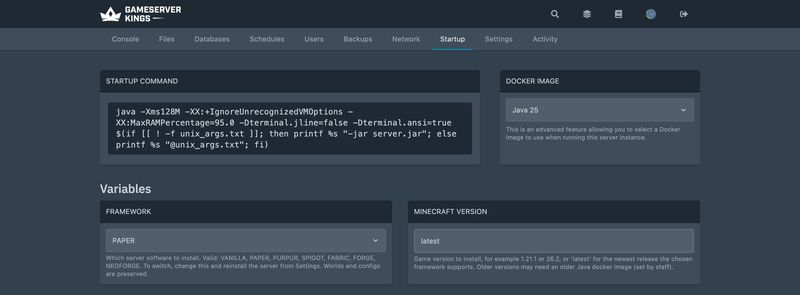
Paper recommends updating your server jar at least weekly for the build-level fixes, but treats Minecraft version jumps as a separate, more deliberate exercise. It also explicitly discourages automatic updates: "doing so is not recommended by Paper due to the possibility of plugin conflicts or other issues that you may not know about. Always be present during updates."
Check that the version you are moving to is still supported
Paper publishes support status as machine-readable JSON, so this is checkable rather than guesswork. Request https://fill.papermc.io/v3/projects/paper/versions/<version> and read version.support.status. As of 28 September 2026:
| Paper version | Status |
|---|---|
| 26.3 | SUPPORTED — but every 26.3 build so far is on the ALPHA channel |
| 26.2 | SUPPORTED |
| 26.1.2 | UNSUPPORTED — support ended 26 July 2026 |
| 26.1.1 | UNSUPPORTED — support ended 11 April 2026 |
| 1.21.11 | UNSUPPORTED — support ended 15 June 2026 |
| 1.21.8 | UNSUPPORTED — support ended 14 November 2025 |
| 1.20.6 and older | UNSUPPORTED |
Only the 26.x line receives fixes now. A server still on 1.21.11 is not broken, but it is no longer getting patches, and plugin authors will drift away from it.
5. Updating a Modded Server
Modded updates are harder, and the order is different: the pack leads, not the Minecraft version.
- Take the backup.
- Confirm the pack has a release for the version you want. If it does not, you are done — wait. Do not update Minecraft under a pack.
- Download the pack's new Server Files archive (not the client pack).
- Stop the server, apply the pack's own upgrade instructions — usually replacing
mods/,config/and any startup scripts — and set the matching Minecraft and loader version in the Startup tab. - Start, and read the console. Modded servers name the offending mod in the crash log when something is wrong.
- Tell your players the exact pack version. Every one of them has to be on the same loader and mod list or they cannot connect.
Loose mod lists — as opposed to a published pack — have to be updated mod by mod, and one mod without a build for the new version blocks the whole update. Fabric's own documentation puts the risk plainly: "A mod that worked on version 1.21.8 for instance, might not work anymore on 1.21.11."
The pack-by-pack workflow, including the launcher side, is in How to Install a Minecraft Modpack Server; loaders generally are covered in How to install mods for Minecraft Java Edition, and the trade-offs between them in Minecraft Server Software Compared.
6. What Happens to Your World
Every world save records a data version — an ever-increasing integer, stored in level.dat and again in every individual chunk, that identifies the exact Minecraft version that last wrote it. When a newer server loads an older world, it upgrades the data it touches.
Three things follow from that, and they matter:
- The upgrade is gradual. Chunks are upgraded as they are loaded, not all at once on boot. Paper's own note on the
--forceUpgradeflag says a full upgrade "should rarely ever be used" because "the upgrade system in Paper is fast enough to do upgrades gradually as you play." If you do want everything converted up front — before a pre-generated map goes live, for instance — that is what the flag is for, and--eraseCacheand--recreateRegionFilesaccompany it. - The upgrade is one-way, and silent. The client asks you before opening an out-of-date world. A server does not. It loads the world, upgrades the chunks and carries on. Your backup is the only undo.
- Mixed data versions are normal. Chunks nobody has visited keep their old data version indefinitely. That is fine, and it is why the very first visit to a distant area after an update can be briefly slow.
You can read the data version at any time. In game, /data get entity @s DataVersion returns it, and since 25w15a the /version command prints it directly.
7. Plugins and Mods Across a Version Jump
Expect breakage on a Minecraft version change, and understand which kind you are looking at.
Plugins that use only the Bukkit API — the stable surface that Paper, Purpur and Spigot all implement — often survive several Minecraft versions untouched. Plugins that reach into Minecraft's internals do not. PaperMC's developer documentation is explicit about why: "using internal code directly is not guaranteed to be stable and it changes often. This means that your plugin may break when a new version of Minecraft is released."
In practice:
| Symptom in the console | What it means |
|---|---|
Plugin X is not compatible with this server version / Unsupported API version |
The plugin's declared API version predates the server. Get a newer build |
NoSuchMethodError / NoClassDefFoundError naming an net.minecraft class |
The plugin used internals that moved. Only a new plugin build fixes it |
Plugin X depends on Y |
A dependency was not updated alongside it — often Vault, ProtocolLib or PlaceholderAPI |
| A mod named in a boot crash | Wrong Minecraft version, wrong loader, or a missing dependency for that mod |
Update the add-ons before the server version wherever you can, using Paper's plugins/update folder for the staging. A plugin built for the new version will normally still load on the old one; the reverse usually will not.
8. Downgrading
There is no supported way to move a world backwards.
The data version in level.dat and in each chunk is written by whatever version last saved it, and older code has no logic for reading formats that did not exist when it was written. Minecraft's own client warns that a world saved by a newer version may become corrupted if you open it in an older one. A server will simply try, and the outcome ranges from missing blocks to an unreadable save.
What actually works:
- Restore the pre-update backup. This is the real downgrade path, and it is the reason section 3 exists. You lose whatever happened after the backup, and nothing else.
- Run the old version alongside, on a copy. If you need the old world available while you sort out a plugin, restore the backup to a second server rather than downgrading in place.
Old server jars remain available indefinitely. Every historical Java Edition release, back to the earliest, is listed in Mojang's version_manifest_v2.json with a link to its own metadata file, and that metadata carries a direct server.jar download URL along with the Java version that release requires. Panels expose this as a version dropdown; there is no need to hunt for jars on third-party sites.
"Just set the version back" does not undo an update
Rolling the Startup tab's version number back does not roll the world back — the world has already been upgraded on disk. Setting the jar back to 1.21.11 after a 26.2 boot leaves you with a 26.2 world and a 1.21.11 server. Restore the backup instead.
9. Snapshots, Pre-releases and Release Candidates
Development versions were renamed at the same time as releases, and the old format has left the normal development cycle.
- Snapshots were
YYwNNn—25w44abeing the first snapshot of week 44 of 2025. From December 2025 they use the same style as everything else:<Version> Snapshot <N>, starting with 26.1 Snapshot 1. The launcher and version manifest render this as26.3-snapshot-9. The one placeYYwNNnsurvives is Mojang's annual April Fools joke snapshot —26w14a, released 1 April 2026, is a fork of 26.1.1 and is not part of any release's development. - Pre-releases are unchanged in style:
26.2 Pre-Release 1through26.2 Pre-Release 6. - Release candidates likewise:
26.2 Release Candidate 1,26.2 Release Candidate 2.
Mojang publishes a runnable server.jar for every one of these, so a snapshot server is genuinely possible — checked on 18 August 2026, 26.3-snapshot-9, 26.2-pre-1 and 26.2-rc-1 all carry a server download in their metadata, all requiring Java 25.
Running one is a different question. Realistic expectations:
- Plugins will not work. Paper does not build for arbitrary snapshots, and Bukkit-family plugins are compiled against a release API.
- Fabric is the usual choice for snapshot servers — its loader metadata already tracks the 26.4 snapshots.
- Never point a snapshot at your live world. The world is upgraded to the snapshot's data version, and there is no way back to the release. Use a copy.
- Snapshot worlds can break between snapshots, not just between releases. Treat them as disposable.
The right use of a snapshot server is testing what the next drop does to your setup — a copy of your world, a copy of your config, and a fresh look at whatever your community depends on. It is not a way to be first.
10. Recent Changes That Will Surprise You
A short list of things that changed under people's feet, all of which cause "I set it and nothing happened" tickets.
Several server.properties keys stopped existing. 1.21.9 removed pvp, enable-command-block, allow-nether and spawn-monsters, replacing them with game rules; 1.21.2 removed spawn-animals and spawn-npcs outright. Setting them today does nothing at all — the server reads the file and ignores the keys. Every removal and its replacement is listed in Minecraft server.properties: The Complete Reference.
Game rules were renamed in 1.21.11. They moved into a registry and changed from camelCase to snake_case at the same time. If you are scripting /gamerule calls, they need rewriting once across that boundary. Both spellings are documented in Getting started with your Minecraft server.
white-list defaults to true from 26.3. It was false up to 26.2. On 26.3 and later, a freshly generated server.properties has the whitelist on, and a brand-new server rejects everyone — including you — until you add yourself. Plan for it rather than debugging it; the server.properties reference covers the whitelist keys in full.
New properties arrived too. 1.21.9 added the management-server-* family and status-heartbeat-interval; 26.2 added chat-spam-threshold-seconds and command-spam-threshold-seconds. None of these break an upgrade, but they will appear in your file and are worth reading rather than deleting.
Paper's config moved. Paper keeps its configuration in a config/ directory — config/paper-global.yml and config/paper-world-defaults.yml — with per-world overrides at world/dimensions/<namespace>/<key>/paper-world.yml. Older guides that tell you to edit paper-world-defaults.yml in the server root are describing an earlier layout.
11. FAQ
What version should I run?
26.3 on Vanilla or Fabric — it is the current release. On Paper, stay on 26.2 for now: Paper lists both 26.2 and 26.3 as SUPPORTED, but as of 28 September 2026 every Paper 26.3 build is still on the ALPHA channel. Paper no longer supports 26.1.
Is there going to be a 1.22?
No. The 1. line ended at 1.21.11 in December 2025. The next release is 26.4, already in snapshots, then 27.1 in 2027.
My server will not start after updating. What is the first thing to check?
The Java version. A 26.x jar on Java 21 fails immediately with an unsupported class file version. Set the runtime to Java 25 in the Startup tab.
Can I update Minecraft but keep my old plugins?
Sometimes, for plugins that only touch the Bukkit API — but you will not know which until you try, and the console tells you within seconds of boot. Take the backup first and check the console before announcing the update.
Do I have to update at all?
No. An old version keeps working. What you lose is security and bug fixes, plugin and mod support as authors move on, and the ability for players on the current client to connect at all — Minecraft clients can only join servers on their own protocol version.
My players say "Outdated server" or "Outdated client".
Their client version and the server version do not match. Java Edition has no cross-version compatibility built in: either they switch their launcher profile to your version, or you update the server. A proxy does not solve this by itself — a proxy such as Velocity speaks a wide span of protocol versions, but the backend server still has to be one the client can actually play on.
12. What to Read Next
- Getting started with your Minecraft server for first boot,
server.propertiesand the current game rule names - Minecraft Update Day Checklist for the short reusable version to work through on release day itself
- Minecraft Server Software Compared for choosing between Vanilla, Paper, Purpur, Folia and the mod loaders
- How to install plugins for Minecraft Java Edition for plugin sources and dependency troubleshooting
- How to install mods for Minecraft Java Edition for loader and modpack updates
- Minecraft server.properties: The Complete Reference for every key, including the ones recent versions removed
- Minecraft Server RAM and JVM Flags for the heap and Java settings that change with the runtime
- Managing your Minecraft server for backups, scheduled restarts and profiling
- Minecraft Server Commands for
/save-all,/save-offand the safe pre-update command sequence
Primary sources used for this guide (all checked 18 August 2026): the Minecraft Wiki on version formats, Java Edition version history, game drops, server.properties and data versions; Mojang's version manifest; and PaperMC's update guide, requirements and CLI reference.
- Best Minecraft Horror Mods — why a version bump is what breaks a horror mod set
- Minecraft Trial Chambers: Loot, Vaults and Spawners — a structure that needs 1.21 chunks to exist at all
Made with 💜 by GameServerKings

Need a Minecraft server?
Deploy an instantly-provisioned Minecraft server on high-clock hardware — DDoS protected, no contracts, cancel anytime.
From $4.80 /month