Fixing YAML and JSON Config Errors on a Minecraft Server
A config error names the file, the line and the column. How to read a SnakeYAML or Gson message, and the six mistakes behind most of them.
A server that stops and points at a config file has given you more information than almost any other failure. The parser that rejected the file reports what it was doing, what went wrong, and exactly where — file, line and column. Nearly every guide to this tells you to "check your YAML indentation", which is right about a third of the time and useless the rest.
This page covers the two parsers a Minecraft server actually uses, how to read each one's output, and the small set of mistakes that produce most of the errors. For the wider question of a server that will not start, see Minecraft Server Won't Start.
Which File Is In Which Format
Three different formats live side by side on a Minecraft server, and they fail in three different ways.
| File | Format | Parsed by |
|---|---|---|
server.properties |
Java properties | The server's own reader |
bukkit.yml, spigot.yml, paper-global.yml, paper-world-defaults.yml |
YAML | SnakeYAML |
plugins/<Plugin>/config.yml and most plugin configs |
YAML | SnakeYAML |
plugin.yml inside a plugin jar |
YAML | SnakeYAML |
ops.json, whitelist.json, banned-players.json, banned-ips.json |
JSON | Gson |
pack.mcmeta, datapack and resource pack files |
JSON | Gson |
usercache.json |
JSON | Gson |
The current Paper server ships SnakeYAML 2.6 and Gson 2.14.0, so the message wording below is what you will see on a 26.2 server.
YAML does not allow tab characters for indentation
This single rule causes more Minecraft config errors than everything else combined. Editors that helpfully convert leading spaces to tabs — or a copy-paste out of a web page — will break a file that looks perfectly fine on screen. Set your editor to insert spaces, and use two per level.
Reading a SnakeYAML Error
A YAML error has four parts and they always appear in the same order: the context (what the parser was in the middle of), the problem, the position, and a snippet with a caret under the offending character.
while scanning for the next token
found character '\t(TAB)' that cannot start any token. (Do not use \t(TAB) for indentation)
 in 'reader', line 12, column 1:
    	enabled: true
^'reader'is the parser's default name for the stream. It is not the filename — look at the line above the error in the console for that.line 12, column 1is 1-based, so line 12 is the twelfth line of the file.- The caret sits under the exact character that broke it.
Read the context line first. while scanning for the next token means the failure is at the character level; while parsing a block mapping means the structure went wrong further back than the caret suggests.
The messages you will actually hit
| Message | What it means | Usual cause |
|---|---|---|
found character '\t(TAB)' that cannot start any token. (Do not use \t(TAB) for indentation) |
A tab in the indentation | Editor or paste |
mapping values are not allowed here |
A : appeared where the parser expected plain text |
An unquoted value containing a colon, such as a URL or 12:00 |
while parsing a block mapping + expected <block end>, but found '<block sequence start>' |
Indentation changed by an amount the structure does not allow | A key indented under the wrong parent |
could not find expected ':' |
A key with no value separator | A wrapped long line, or a missing colon |
while scanning a simple key + A simple key is required only if it is the first token in the current line |
Two keys on one line | A deleted line break |
while scanning a quoted scalar + found unexpected end of stream |
A quote was opened and never closed | An apostrophe inside a single-quoted string |
found duplicate key |
The same key twice in one mapping | Copy-paste, or an old key left above a new one |
special characters are not allowed |
A control character or invalid byte in the file | The file was saved in the wrong encoding, or is binary |
while parsing a flow mapping + expected ',' or '}', but got … |
A { } inline mapping is malformed |
Hand-written inline config |
The colon trap, in detail
This is the one worth memorising, because the error text does not obviously describe it:
motd: Welcome! Visit https://example.comhttps://example.com contains a colon, so YAML reads motd: Welcome! Visit https as a key and //example.com as a stray value, and reports mapping values are not allowed here — pointing at the second colon, not the string. Quote the value and it parses:
motd: "Welcome! Visit https://example.com"The same applies to times (08:00), IPv6 addresses, Windows paths and any message containing a colon followed by a space.
The version-number trap
api-version: 1.21YAML types unquoted 1.21 as a float. Some consumers cope; some do not, and a three-part version like 1.21.5 is a string while a two-part one is a number, which makes the failure look random. Quote every version number:
api-version: '1.21'Reading a Gson Error
JSON errors are one line and they carry a path, which makes them easier than YAML once you know the shape:
com.google.gson.JsonSyntaxException: java.lang.IllegalStateException: Expected BEGIN_OBJECT but was STRING at line 3 column 5 path $.packExpected X but was Y— the structure is wrong, not the syntax. The file parsed fine; something is the wrong type.$.packis the JSON path to it.at line 3 column 5— the position, 1-based.- The outer
JsonSyntaxExceptionis Gson's wrapper. The inner exception is the one that names the fault:IllegalStateExceptionfor a structure problem,MalformedJsonExceptionfor a syntax one.
The syntax family, all reported the same way:
| Message | Cause |
|---|---|
Unterminated object |
A missing } |
Unterminated array |
A missing ] |
Unterminated string |
A missing " |
Expected name |
A value where a key was expected — usually a trailing comma |
Expected value |
A key with nothing after the colon |
Invalid escape sequence |
A stray \ in a string; in JSON, backslashes must be doubled |
Malformed Unicode escape \u |
A \u not followed by four hex digits |
Use JsonReader.setStrictness(Strictness.LENIENT) to accept malformed JSON |
Appended to several of the above. It is advice for a developer, not something you can set — ignore it |
JSON has no comments and no trailing commas. A // line or a comma after the last element in a list is the cause of a large share of hand-edited pack.mcmeta and datapack failures.
server.properties Fails Differently
It is neither YAML nor JSON, so none of the above applies. It fails quietly:
Failed to load properties as UTF-8 from file server.properties, trying ISO_8859_1
Failed to load properties from file: server.propertiesThe first line is logged at INFO and is a harmless fallback. The second means the file could not be read at all. Individual bad values do not stop the boot — the server logs what it could not understand and falls back to a default, for example:
Failed to parse level-type minecraft:supperflat, defaulting to minecraft:normal
Invalid rcon port 0 found in server.properties, rcon disabled!The trap here is the backslash: in a properties file \ is an escape character, so a Windows path or a \n in the MOTD does not survive. Minecraft server.properties: The Complete Reference covers every key and its accepted values.
When It Is ops.json or whitelist.json
Broken player lists produce their own messages, and the server keeps running with an empty list rather than stopping:
Failed to load white-list:
Failed to load operators list:
Failed to load user banlist:That behaviour is worth knowing before it surprises you: a whitelist.json that fails to parse means an empty whitelist, and with white-list=true that locks everyone out; a broken ops.json means nobody is an operator. The stack trace under the message is a Gson error and reads as above. Minecraft Whitelist and Ban Management covers editing these safely from the console instead of by hand.
A Repair Order That Works
- Read the position, not the whole file. Go to the line and column the parser named and look at that character before anything else.
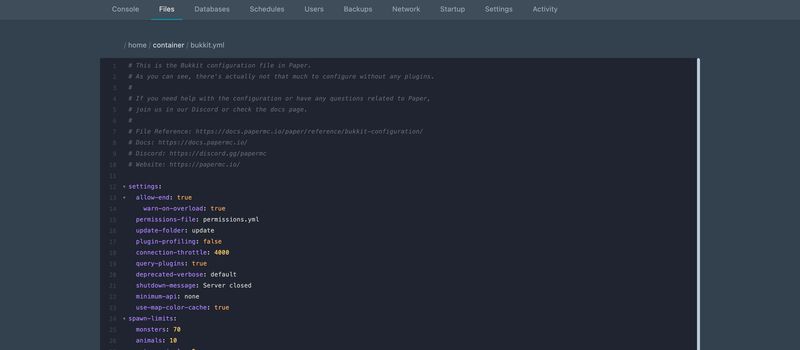
- Check for tabs. In the File Manager's editor, select the indentation on the failing line — a tab selects as one wide block, spaces as individual characters.
- Quote anything with a colon, a
#, a leading zero, or a version number. - Validate before restarting. Any offline YAML or JSON validator will find the fault in seconds and saves you a restart cycle.
- If you cannot find it, rename the file and restart. Every file listed at the top of this page is regenerated with defaults when it is absent. You lose the settings, not the server — and you can then paste your values back in a few at a time.
Keep the broken file
Rename it to
config.yml.brokenrather than deleting it. The server ignores anything that is not the expected filename, and you keep your settings to copy back from.
What to Read Next
- Minecraft Server Won't Start — if you are not yet sure a config is the problem
- Reading Minecraft Server Logs and Crash Reports — the stack trace under a parse failure
- Minecraft server.properties: The Complete Reference — every key, and the values it accepts
- Minecraft "Plugin Not Compatible With This Version" — when the file parses but the plugin still will not load
- Minecraft Whitelist and Ban Management — managing
whitelist.jsonandops.jsonfrom the console - How to install plugins for Minecraft Java Edition — where plugin configs are created
- How to Install Datapacks and Resource Packs on a Minecraft Server —
pack.mcmetaand pack formats - How to upload files via SFTP — for editing configs in a real editor rather than the browser
Made with 💜 by GameServerKings

Need a Minecraft server?
Deploy an instantly-provisioned Minecraft server on high-clock hardware — DDoS protected, no contracts, cancel anytime.
From $4.80 /month