Minecraft Server Won't Start: Triage by What You Actually See
Your Minecraft server will not start and you have no error message yet. Sort it by what the console does, then go to the page that covers your failure.
Most guides to a Minecraft server that will not start assume you already have an error message. If you had one, you would have searched for it. This page is for the other case: the console does something unhelpful, the panel will not go green, and there is no obvious line to copy.
It sorts by what you observe, because how far the server got before it stopped narrows the cause more sharply than anything else. Each branch ends at the page that covers that failure in full. Once you do have an exact message, Reading Minecraft Server Logs and Crash Reports is the index to it.
First: What a Healthy Start Looks Like
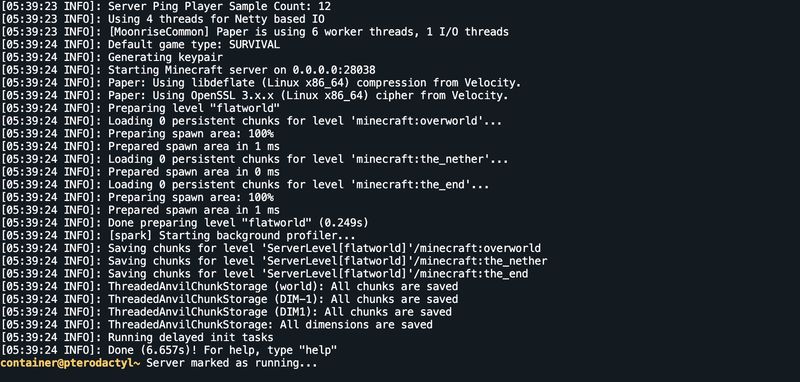
You cannot judge how far your server got without knowing the milestones. A Paper server on 26.2 — the framework our Minecraft (Java) egg installs by default — prints these lines, in this order. Find the last one your console reached.
| The line | What has just finished | What it rules out |
|---|---|---|
| (installer output) | The framework jar was downloaded or built | A broken install |
Starting minecraft server version 26.2 |
The JVM started and Minecraft's own code is running | Java version, jar name, memory sizing |
Loading properties |
server.properties was read |
A missing or unreadable properties file |
Default game type: SURVIVAL |
Properties parsed into settings | A malformed properties value |
Starting Minecraft server on 0.0.0.0:<your port> |
The listening socket is being opened | Nothing yet — the bind happens next |
Preparing level "world" |
The port is bound; world loading has begun | A port conflict |
Selecting spawn point for level 'minecraft:overworld'... |
The spawn point was chosen. Only printed while a world is being created | A failure during world creation |
Loading 0 persistent chunks for level 'minecraft:overworld'... |
level.dat was read and force-loaded chunks, if any, are loading. Printed once per dimension |
World-level corruption |
Prepared spawn area in 2401 ms |
That dimension's spawn chunks are ready. Also once per dimension | Chunk corruption |
Done preparing level "world" (2.656s) |
Every dimension has finished loading | Chunk corruption |
Done (6.657s)! For help, type "help" |
The server is up and accepting connections | Everything on this page |
The panel watches for one specific string
Our Minecraft egg marks a server Running when the console emits
)! For help, type— the tail of that last line. Nothing else flips the state. A server that is genuinely working but sits on Starting in the panel has not printed that line yet, which means it is still loading chunks, not that the panel is wrong.
One line here surprises people. Paper does print Preparing spawn area: 100% during world load, but it is not a progress bar: it arrives as a single line already reading 100%, at most once per dimension, and on a restart of an existing world it frequently does not appear at all. Read nothing into its absence, and do not sit waiting for a percentage that climbs. (On vanilla it is not server output at all — Preparing spawn area: %s%% is the client lang string menu.preparingSpawn.) What you will not see is a Done line on a server that crashed during world load; if you have Preparing level but no Done preparing level, the failure is between those two lines.
The Triage Table
| What you see | Most likely cause | Go to |
|---|---|---|
| Console prints one line, then nothing | The launcher could not open the jar | Nothing but one line |
| Console prints nothing at all | The process died before writing, or you are looking at a stale tab | A completely empty console |
Output stops before Starting minecraft server version |
Java version, EULA, or the jar itself | It stops before Minecraft's own lines |
Output stops between Starting Minecraft server on and Preparing level |
The port could not be taken | It stops at the port |
Output stops between Preparing level and Done preparing level |
World data, datapacks, or a mod touching world load | It stops while loading the world |
It reaches Done, then exits a few seconds later |
Something is calling stop, or the container is being killed | It starts and then exits |
| Panel sits on Starting forever, console still moving | Slow chunk load — usually not a fault | Stuck on Starting |
| It starts fine, but nobody can join | Not a start problem at all | Minecraft Players Can't Connect |
Nothing but One Line
A single line of output, then the process is gone, almost always means the java launcher itself failed — before the Java Virtual Machine started, and therefore before any log file was written. The tell is that logs/latest.log still carries an older timestamp.
The five messages in this family are Error: Unable to access jarfile, Error: Invalid or corrupt jarfile, no main manifest attribute, Error: Could not find or load main class and Error: could not open 'unix_args.txt'. They mean different things and have different fixes: Minecraft "Error: Unable to access jarfile" works through all five.
A Completely Empty Console
Check in this order.
- Are you looking at a live session? The Console tab only renders output produced while you had it open. Restarting with the tab closed loses everything. Open
logs/latest.login the File Manager instead — if its timestamp is from this attempt, there was output and you missed it. - Did the install finish? Scroll the console to the very top. The installer runs before the launch command; a failed download leaves nothing to launch. Reinstalling with Minecraft Version and Build Number both set to
latestis the quickest way to prove it. - Was the process killed from outside? A container that exceeds its memory limit is killed by the kernel, not by Java — there is no error, no crash report, and the log simply stops. If
logs/latest.logends mid-sentence with no exception, that is what happened. Minecraft "java.lang.OutOfMemoryError: Java heap space" explains how to tell the two memory failures apart.
It Stops Before Minecraft's Own Lines
Everything up to Starting minecraft server version is the JVM and the bootstrap. Three failures live here.
Wrong Java version. UnsupportedClassVersionError names two class-file versions, and the arithmetic is Java version plus 44. Minecraft 26.1 and newer need Java 25, which is class file version 69.0. Raise the Java version on the Startup tab; do not downgrade Minecraft. The full table is in Reading Minecraft Server Logs and Crash Reports.
The EULA. A brand-new server writes eula.txt and exits with You need to agree to the EULA in order to run the server. Go to eula.txt for more info. Set eula=true and start again. On our servers the Accept Mojang EULA variable does this during install, so seeing this at all usually means the file was replaced by hand.
A bad datapack. Failed to load datapacks, can't proceed with server load. You can either fix your datapacks or reset to vanilla with --safeMode is fatal and explicit. Setting Extra Flags to --safeMode starts the server with the vanilla datapack only, which gets you back in to remove the offender. How to Install Datapacks and Resource Packs covers pack formats.
It Stops at the Port
Starting Minecraft server on 0.0.0.0:<your port> immediately followed by **** FAILED TO BIND TO PORT! means the socket could not be opened. On managed hosting the realistic causes are an old process that has not fully exited, or a hand-edited server-ip. Note that our panel rewrites server-ip, server-port and query.port in server.properties on every boot, so editing them by hand does not survive — and a value that was wrong for one start can still break the next one. Minecraft "Failed to Bind to Port" covers each underlying exception.
It Stops While Loading the World
You have Preparing level "world" but never reach Done preparing level. This band is world data and anything that hooks into world load.
Failed to load world data. World files may be corrupted. Shutting down.—level.datis unreadable. Restore a backup; see How to create a backup.This world was created by an incompatible version.— the world was written by a newer Minecraft than the server is now running. Minecraft does not support downgrading a world. Put the server back on the version that wrote it, or restore a pre-upgrade backup. Updating Your Minecraft Server and How to Run a Minecraft Snapshot Server both cover this door, which only opens one way.Missing data pack <name>— the world's saved pack list names a pack that is no longer installed. This is common right after switching framework, because Paper and Purpur register apaperdata pack that vanilla and the mod loaders do not have. Minecraft "Missing Mods in World" covers the whole family, including the mod-registry version.- A mod or plugin failing in world load. Read the stack trace and find the first non-
net.minecraftpackage. If nothing is named, bisect — the method is in Reading Minecraft Server Logs and Crash Reports.
It Starts and Then Exits
Reaching Done (…)! means the server was genuinely up. An exit within seconds after that is a different problem to a start failure.
- A scheduled task. A restart schedule or an automation plugin firing
stopimmediately after boot. Check Minecraft Scheduled Restarts and Server Automation. - A plugin calling shutdown. Anti-cheat and licence-checking plugins sometimes stop the server on a failed check. The log will say so above the shutdown.
- The watchdog.
A single server tick took 60.00 secondsis a hang, not a crash — see Minecraft "Can't keep up! Is the server overloaded?" and Diagnosing Minecraft Server Lag. - Memory. An immediate
OutOfMemoryError, or a log that stops mid-line with nothing after it, points at Minecraft "java.lang.OutOfMemoryError: Java heap space".
Stuck on Starting
If the console is still producing output, nothing is wrong — the server has not printed the Done line yet, so the panel has nothing to react to. A large modpack, a big pre-generated world or a first boot on a new world can spend several minutes between Preparing level and Done preparing level.
It is only a fault if the console has been silent for minutes as well. In that case the process is either wedged or dead, and the last line printed tells you which band above to read.
Do not keep restarting before you copy the log
Every restart rotates
logs/latest.loginto a gzipped file and begins a new one. Three hopeful restarts push the useful log two files back and leave you diagnosing a run that was fine. Copy it out first, then experiment.
What to Read Next
- Reading Minecraft Server Logs and Crash Reports — the index of exact error messages, how to read a stack trace, and how to bisect a bad mod or plugin
- Minecraft "Error: Unable to access jarfile" — the one-line launcher failures
- Minecraft "Failed to Bind to Port" — the port band
- Minecraft "java.lang.OutOfMemoryError: Java heap space" — heap crashes and container kills
- Minecraft "Can't keep up! Is the server overloaded?" — the warning that precedes a watchdog kill
- Minecraft Players Can't Connect — for a server that starts perfectly and still rejects joins
- Updating Your Minecraft Server — Java requirements and safe version moves
- Minecraft server.properties: The Complete Reference — every key named here
- How to create a backup — before any world-level experiment
Made with 💜 by GameServerKings

Need a Minecraft server?
Deploy an instantly-provisioned Minecraft server on high-clock hardware — DDoS protected, no contracts, cancel anytime.
From $4.80 /month